Losing important data from your iPhone is a stressful experience, but the right recover tool can effectively reverse the data loss. AnyMP4 iPhone Data Recovery is built to retrieve lost or deleted files with an official 99.9% success rate. As a dedicated iOS recovery tool, it helps you rescue up to 20 different data types, including photos, contacts, text messages, and WhatsApp chats.
AnyMP4 iPhone Data Recovery software operates through three distinct modes: direct recovery from your iOS device, or safe extraction from iTunes and iCloud backups. It is designed to handle a wide range of common data loss scenarios. Whether your iPhone has suffered water damage, has a busted screen, is stuck in a system loop, or lacks a recent backup, this iPhone rescue tool locates your missing files. Available for Windows and Mac, it lets you preview your data clearly before exporting it, ensuring a precise and secure recovery process.
Key Features of AnyMP4 iPhone Data Recovery
Three Core iOS Recovery Modes
- Direct iOS Device Recovery
- iTunes Backup File Extraction
- iCloud Backup Restoration
Supported Data Types (Up to 20 Categories)
- Media: Photos, Videos, Audio, Voice Memos
- Communications: Contacts, SMS, Call History
- Third-Party Apps: WhatsApp, Kik, Line, Viber
- Essentials: Notes, Calendars, Reminders, Safari Bookmarks
Covered iPhone Data Loss Scenarios
- Accidental File Deletion
- Water and Liquid Damage
- Busted or Smashed Screens
- Forgotten Screen Passcodes
- System Crashes and Boot Loops
- Lost or Stolen iPhones
- Data Loss Without Prior Backups
User Control and Export Options
- Detailed Pre-Recovery File Preview
- Selective Item Restoration
- Custom PC and Mac Export Paths
- Contact Exports in CSV or VCF Formats
- Local Computer Backup for Existing Data
How to Use AnyMP4 iPhone Data Recovery Effectively
Data loss can be a stressful experience, but navigating the file retrieval process shouldn’t be. AnyMP4 iPhone Data Recovery provides a secure and straightforward way to rescue your essential files without requiring advanced technical skills. By utilizing the software’s three dedicated recovery modules, you can quickly scan, preview, and restore your missing data based on your specific situation.
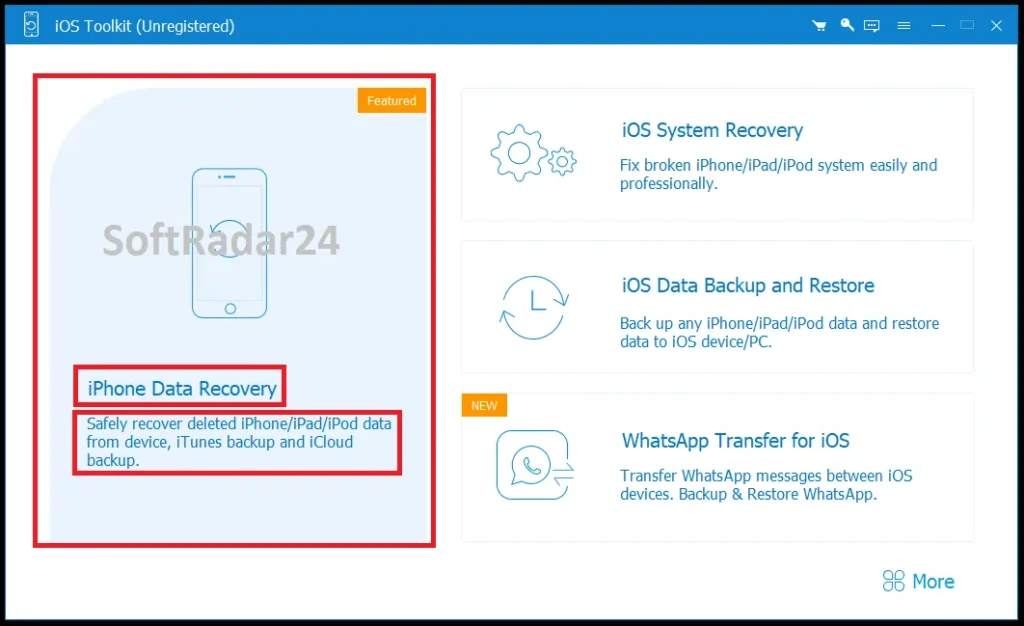
How to Recover Data from iOS Devices
This method is perfect when you need to extract lost or deleted files directly from your physical hardware, especially if you haven’t created a recent backup. Follow these steps to start the retrieval:
- Connect the Device: Launch the software and select the “Recover from iOS Device” option. Connect your iPhone to the computer using a USB cable. Unlock your device and tap “Trust” on the screen.
- Initiate the Scan: Once the program successfully detects your connected iPhone, click the Start Scan button. The tool will begin a deep analysis of your device to locate all existing and deleted files.
- Preview and Restore: After the scan is complete, click on any category on the left panel to preview the details. Select the specific files you want to keep and click Recover to save them directly to your computer.
How to Recover from iTunes Backup
If your iOS device is lost, heavily damaged, or completely inaccessible, this mode allows you to securely extract your data from previously synced iTunes files.
- Choose the Mode: Open the application and click on the “Recover from iTunes Backup File” option from the main interface.
- Select a Backup to Scan: The software will automatically list all the iTunes backup files currently stored on your computer. Choose the specific backup file containing your missing data and hit the Start Scan button.
- Export Your Files: Browse through the data categories to preview the contents. Mark the checkboxes for the items you need, and click Recover to export them safely to your local drive.
How to Recover from iCloud Backup
For users who rely heavily on cloud storage, this option provides a safe way to download and retrieve specific data types straight from Apple’s servers.
- Log in Securely: Select “Recover from iCloud” and enter your Apple ID and password. If two-factor authentication is enabled, enter the verification code sent to your device.
- Choose Data to Scan: Select the exact data types you want to recover (such as Notes, Reminders, or Photos) and click the Start button to begin downloading those specific files.
- Select and Recover: Navigate through the left menu bar to view your downloaded iCloud data. Check the boxes next to the items you wish to restore, and click Recover to save them to your computer.
Free iPhone Data Recovery vs. AnyMP4 iPhone Data Recovery Full
| Features | Free iPhone Data Recovery | AnyMP4 iPhone Data Recovery |
|---|---|---|
| Recover data from iOS devices directly | ✅ Supported | ✅ Supported |
| Recover data from iTunes backup | ✅ Supported | ✅ Supported |
| Recover data from iCloud backup | ❌ Not supported | ✅ Supported |
| Fix iOS system issues | ❌ Not supported | ✅ Supported |
| Backup WhatsApp data | ❌ Not supported | ✅ Supported |
| Photos, Voice Memos, Notes, Reminder, Safari bookmark, WhatsApp, Videos | ✅ Supported | ✅ Supported |
| Contacts, SMS, iMessages, Call History, Calendar | ❌ Not supported | ✅ Supported |
| App data and attachments (Kik, Line, Viber, Messenger) | ❌ Not supported | ✅ Supported |
| iOS support | iOS 13 and before | All models, including iOS 26 |
AnyMP4 iPhone Data Recovery Discount Code 2026
Securing the best price for AnyMP4 iOS data retrieval software is completely straightforward. There is currently an official 50% discount available across all AnyMP4 iPhone Data Recovery licenses. You do not need to waste any time searching for or manually entering promotional codes. Simply select the license plan that fits your needs and click the corresponding “Buy Now” button. The half-price reduction is automatically applied to your cart on the official secure checkout page.


AnyMP4 iPhone Data Recovery for Windows
AnyMP4 iPhone Data Recovery (Windows) – 1-Year
Perfect for PC users needing reliable iOS file recovery for a single year. Retrieve lost photos, texts, and contacts easily.
AnyMP4 iPhone Data Recovery (Windows) – Lifetime
Secure permanent iOS data protection on your PC. Enjoy lifetime access to retrieve lost iPhone files and free updates forever.
AnyMP4 iPhone Data Recovery for Mac
AnyMP4 iPhone Data Recovery (Mac) – 1-Year
Ideal short-term rescue tool for Mac users. Recover your missing iOS data, iCloud, or iTunes backups seamlessly for one year.
AnyMP4 iPhone Data Recovery (Mac) – Lifetime
The ultimate one-time investment for Mac. Get unlimited lifetime iPhone data recovery, extracting files from any backup safely.
AnyMP4 iPhone Data Recovery Tech Specs & Supported Devices
| Hardware & System Requirements | Minimum Supported Version / Capacity |
|---|---|
| Windows OS | Windows 11, Windows 10, Windows 8.1, Windows 8, Windows 7 |
| Mac OS | Mac OS X 10.7 or above (macOS Tahoe 26 included) |
| CPU | 1GHz Intel / AMD CPU or above |
| RAM | 1 GB RAM or more |
| iOS Versions | iOS 6.0 to iOS 26 (including all intermediate versions) |
| iPadOS Versions | iPadOS 13 to iPadOS 26 |
| Device Category | Supported Models |
|---|---|
| iPhone | iPhone 17 Series, iPhone 16 Series, iPhone 15 Series, iPhone 14 Series, iPhone 13 Series, iPhone SE (1/2/3), iPhone 12 Series, iPhone 11 Series, iPhone XS/XR/X, iPhone 8, iPhone 7, iPhone 6, iPhone 5, iPhone 4S/4, iPhone 3GS |
| iPad | All models of iPad, iPad mini, iPad Air, and iPad Pro |
| iPod | iPod touch, iPod nano, iPod shuffle, iPod mini |
| Recoverable Data Type | Exported File Formats |
|---|---|
| Messaging Apps (WhatsApp, Viber, etc.) | HTML, CSV |
| Contacts | CSV, HTML, VCF |
| Text Messages / iMessages | HTML, CSV |
| Notes & Attachments | HTML, AMR, PNG, JPEG, MOV, HEIC |
| Media (Photos, Videos, Audio) | JPG, JPEG, PNG, GIF, BMP, MOV, MP4, M4A, AAC |
| App Documents | TXT, DOC, DOCX, XLS, XLSX, PDF |