

Quick Summary
Hasleo Backup Suite is Windows backup, restore and cloning software for system images, disks, partitions, files and folders. The current 5.9.2.1 release supports full, incremental and differential backups, Delta Restore, backup scheduling and retention, AES-128/AES-256 image encryption, WinPE emergency media, X86/X64/ARM64 Windows systems and a paid-edition path for Universal Restore, full system-disk cloning and additional deployment features. The most important buying decision is not simply Free versus paid: Home is for personal use, while Professional adds business-use rights and command-line support.
- Best for
- Windows system imaging · disk/SSD migration · scheduled backups · disaster recovery
- Current release
- Hasleo Backup Suite 5.9.2.1 · released July 31, 2026
- Platforms
- Windows Vista or later · X86/X64/ARM64 · Windows Server requires a Server/Enterprise edition
- Key edition boundary
- Free is home-use only; Home adds advanced restore/clone features; Professional adds business usage and command-line support
Hasleo Backup Suite Pricing, Discount Code & License Options
The current Hasleo Backup Suite discounts are applied automatically to the eligible license options below. No manual coupon code entry is required.
Current Hasleo Backup Suite License Prices
The purchase selector currently includes these verified 1-PC Home and Professional offers:
- Hasleo Backup Suite Home V5 · 1 Windows PC · US$29.95
- Hasleo Backup Suite Home + Lifetime Free Upgrades · 1 Windows PC · US$44.95
- Hasleo Backup Suite Professional V5 · 1 Windows PC · US$44.95
- Hasleo Backup Suite Professional + Lifetime Free Upgrades · 1 Windows PC · US$59.95
Hasleo Backup Suite Home V5 is selected first because it is the lowest-priced paid option at US$29.95. Choose Home for personal/non-commercial use; choose Professional when the same core backup and cloning workflow is needed for business use or command-line operation. The lifetime-upgrade variants add future major-version upgrades to the selected edition.
Hasleo Backup Suite Home V5 · 1 PC
1 Windows PC · Home Edition V5 license for personal/non-commercial use
Included with this license- Hasleo Backup Suite Home for 1 Windows PC
- System, disk, partition and file backup with full/incremental/differential modes
- Universal Restore, full system/disk/partition clone and Delta Clone
- BitLocker-preservation options and Home-edition features for personal use
US$29.95V5 license
40% discount automatically applied
Buy NowHasleo Backup Suite Home V5 · 1 PC
Selected first because the US$29.95 Home V5 offer is the lowest-priced paid Hasleo Backup Suite license currently listed.
Current checkout discounts are applied automatically. Standard V5 and lifetime-upgrade licenses differ in upgrade entitlement, while Home and Professional differ in permitted usage and selected advanced features. Confirm edition, upgrade entitlement, PC count, tax and final total before payment.
Can This Software Do What I Need?
Hasleo Backup Suite covers much more than basic file copying, but edition boundaries matter. Use the scenarios below to decide whether Free, Home, Professional or a higher Server/Enterprise edition matches the job. For the wider Hasleo catalog and current offers, visit the Hasleo Software page on SoftRadar24.
I want a complete Windows 11 system image with boot and recovery partitions
System backup
SupportedHasleo Backup Suite System Backup automatically includes the partitions required for Windows operation, including boot, system and recovery partitions. This core workflow is available in Free, Home and Professional.
I need full, incremental and differential backup chains
Backup strategy
SupportedThe current technical specification lists all three backup modes. Scheduling and image-retention policies can automate recurring protection and control how older backup versions are managed.
I want to clone my current Windows system disk to a new SSD
System-disk migration
ConditionalHome and Professional support system, disk and partition cloning. The Free edition is only partial and the current comparison explicitly says it does not support cloning the system disk.
I want to restore Windows to different hardware after a motherboard or PC replacement
Universal Restore
ConditionalUniversal Restore is available in Home and Professional but not Free. It is designed to restore Windows to dissimilar hardware without treating the old machine’s exact hardware layout as mandatory.
I want Delta Restore to return a disk to an earlier image faster
Changed-block restore
SupportedDelta Restore is listed across Free, Home and Professional and restores only blocks that differ on the target. Delta Clone is different: it is excluded from Free and available in Home/Professional.
I need to preserve BitLocker encryption when restoring Windows
Encrypted-system recovery
ConditionalThe current edition comparison and BitLocker restoration guide reserve the Retain BitLocker encryption option for paid editions. Home and Professional support it; Free does not.
I use a Windows-on-ARM Surface or Snapdragon PC
ARM64 Windows
SupportedHasleo currently provides native X86/X64/ARM64 support. The vendor also publishes a current ARM64 Surface SSD-cloning workflow; its own preparation steps recommend backing up first and temporarily disabling BitLocker before the hardware migration.
I rely on ReFS and need intelligent ReFS backup/restore
ReFS
Verify firstHasleo’s current technical and ReFS resource pages describe ReFS V3.14-or-earlier and intelligent ReFS backup support, but the current edition-comparison table reserves the dedicated ReFS feature row for Server/Enterprise. Because the official pages conflict on edition scope, verify the exact Home/Professional behavior you need before purchase.
I need to back up Windows Server
Server workload
Different taskThe engine supports Windows Server platforms, but Home and Professional do not include Windows Server edition support. Hasleo Server or Enterprise is the appropriate license tier.
I need Windows backup software for business use on a workstation
Commercial use
SupportedChoose Professional. Free and Home are not licensed for business usage, while Professional is explicitly intended for home-office and business use and adds command-line support.
I want a Windows backup tool with file sync and cloud-backup functions
Broader backup ecosystem
Better fitAOMEI Backupper Professional is the stronger internal comparison when real-time/two-way file sync and a broader cloud-oriented backup workflow are important alongside imaging and cloning.
My only goal is converting a disk between GPT and MBR
Partition-style conversion
Different taskHasleo paid editions can convert MBR/GPT during selected restore or clone workflows, but a standalone partition-style conversion has different risks and steps. See SoftRadar24’s GPT-to-MBR guide when conversion itself—not backup or migration—is the job.
How It Works
Hasleo Backup Suite separates backup, restore, clone and recovery-media tasks. The safest workflow starts with a verified image before any disk migration or destructive restore.
Create a Windows System Backup
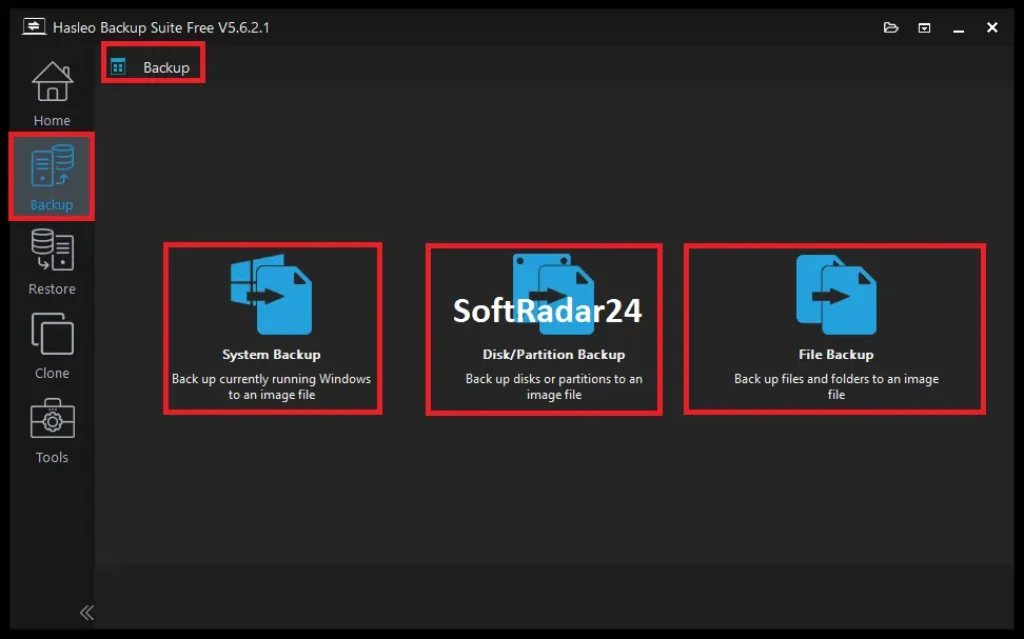
- Open Backup → System Backup. Hasleo Backup Suite selects the partitions required for Windows to boot and recover.
- Choose a destination on a separate disk, external drive or reachable network location.
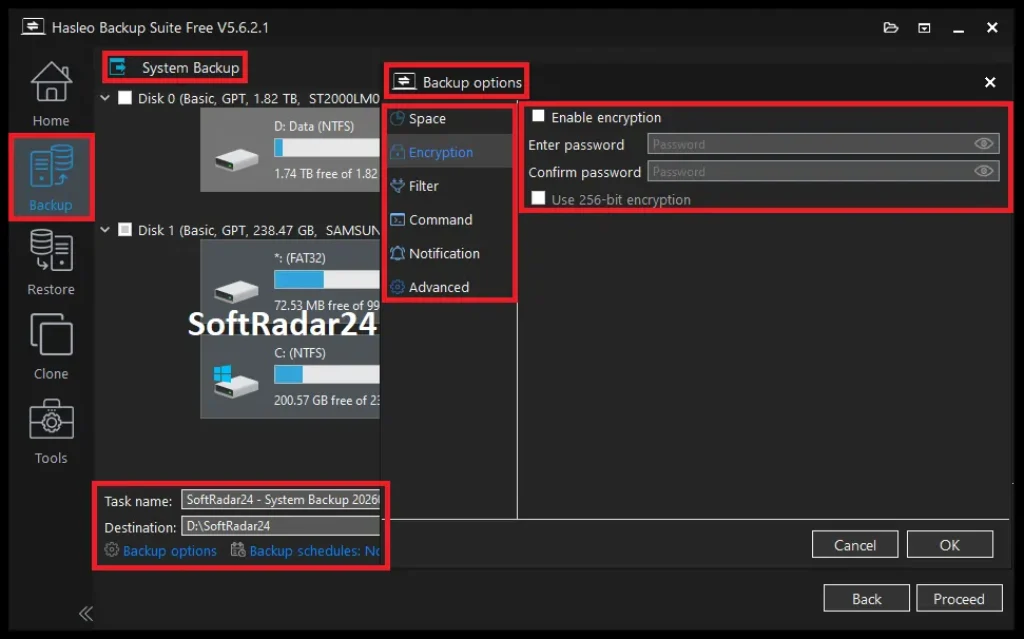
- Configure compression, encryption, filters, schedule and retention settings as required.
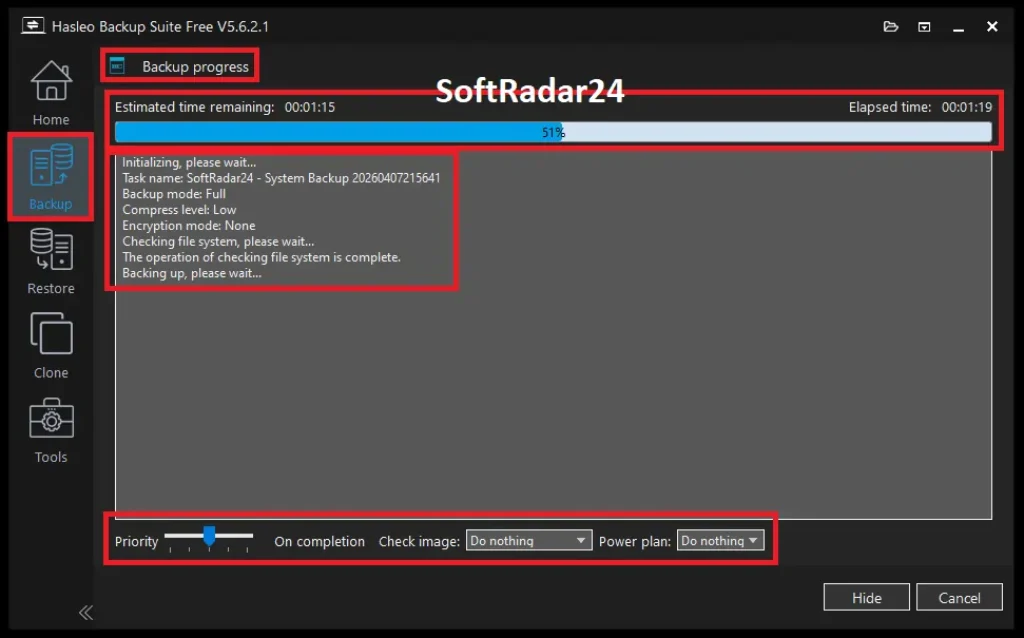
- Start the task and use image checking when the backup completes so integrity is verified before the image is needed for recovery.
Clone Windows to a New SSD
- Create and verify a backup before the migration.
- Open Clone → System Clone or Disk Clone, then select the source and destination disks carefully.
- Choose an automatic, preserved or manually edited target layout. Hasleo can adjust partition size and location when moving to a different-capacity drive.
- For BitLocker-protected hardware migrations, follow the exact vendor workflow for the device; Hasleo’s current Surface guide recommends temporarily disabling BitLocker before replacing the SSD.
Recover Windows When the PC Will Not Boot
- Create WinPE emergency media in advance from Tools → Emergency Disk.
- Boot the failed PC from the emergency media and locate the required backup image.
- Use System mode when the goal is restoring the complete bootable Windows environment; restoring only Windows partitions in Partition mode can produce an unbootable result.
- Select the correct target disk and restoration options, then verify Windows boots and the restored data is accessible.
Product Interface & Workflow
The interface keeps Backup, Restore, Clone and Tools in a left-side navigation structure. The SoftRadar24 screenshots below were captured on Hasleo Backup Suite Free 5.6.2.1; the current release is 5.9.2.1, so minor labels and controls can differ while the main workflow remains recognizable.

Compatibility & Coverage
Hasleo Backup Suite supports a wide Windows hardware range, but operating-system support and license rights are separate. Home/Professional are workstation editions; Windows Server workloads require the corresponding Server/Enterprise license.
| Area | Current coverage | Decision note |
|---|---|---|
| Windows desktop | Windows Vista or later | Current technical specification covers 32/64-bit Windows; modern Windows 10/11 are within that range. |
| CPU architectures | X86 / X64 / ARM64 | Native ARM64 support is explicitly listed across editions. |
| Windows Server | Server 2008 or later at product-engine level | Home and Professional do not include Server-edition licensing; use Hasleo Server/Enterprise. |
| Storage devices | HDD · SSD · USB · Thunderbolt · dynamic disk | Disk/partition operations remain destructive when restoring or cloning to a target; select the destination carefully. |
| File systems | FAT12/16/32 · exFAT · NTFS · ReFS V3.14 or earlier · other via sector-by-sector | Official ReFS edition-scope wording is inconsistent; verify Home/Professional needs before purchase. |
| Backup modes | Full · Incremental · Differential | Available in the current technical specification. |
| BitLocker restore retention | Paid editions | Home and Professional can retain BitLocker encryption during supported restore workflows; Free cannot. |
| System-disk clone | Home / Professional | Free cloning is partial and excludes the system disk. |
| Universal Restore | Home / Professional | Not available in Free. |
| Business use | Professional | Free and Home are not licensed for commercial usage. |
| Command line | Professional | Current edition comparison lists command-line support from Professional upward. |
Features & Capabilities
Hasleo Backup Suite combines image-based protection with migration and recovery tools. Edition-specific features should be separated from core capabilities instead of treating every checkbox as universal.
System, Disk, Partition & File Backup
- Windows system images including required boot/system/recovery partitions
- Whole-disk and selected-partition imaging
- File and folder backup
- Full, incremental and differential backup modes
- Backup destinations accessible through Windows, including local and network locations
Scheduling, Retention & Task Control
- One-time, daily, weekly, monthly and event-triggered schedules
- Image retention policies for managing older backup versions
- Custom backup filters in paid Home/Professional editions
- Backup speed limiting added in version 5.9.2.0
- Email notification improvements including Gmail + SMTP Relay support in version 5.9.2.0
Restore & Recovery
- System, disk, partition and file restore workflows
- Delta Restore across Free/Home/Professional
- Universal Restore in Home/Professional for dissimilar hardware
- WinPE emergency media and Windows boot-menu recovery entry
- Image checking and mounting/exploration for selective recovery
Disk & SSD Cloning
- System, disk and partition cloning in Home/Professional
- Delta Clone in paid editions
- Partition resizing and relocation on the destination disk
- Automatic, keep-layout and manual target-layout modes
- MBR↔GPT conversion during supported paid restore/clone workflows
Image Security & Storage Efficiency
- AES-128 and AES-256 backup-image encryption
- None/Low/Medium/High compression levels
- Split and merge backup-image tools
- Deduplication for File Backup in paid editions
- Backup filters to reduce unnecessary data in supported editions
Important Conditions & Limitations
The most important Hasleo Backup Suite limitations are edition and workflow boundaries. A technically supported operation can still require a different license tier or a different recovery mode.
Free Does Not Mean Every Clone Feature Is Included
Hasleo Backup Suite Free includes system/disk/partition/file backup and Delta Restore, but the current comparison explicitly says Free cannot clone the system disk and does not include Delta Clone, Universal Restore, custom backup filters or file-backup deduplication.
Home Is Not Licensed for Business Use
Home and Home Family are for personal/non-commercial use. Professional is the first current workstation edition that permits business usage and adds command-line support.
Professional Is Not the Server Edition
Professional is intended for Windows workstations in home-office/business environments. Windows Server support, PXE Server and the comparison table’s dedicated ReFS feature require Server or Enterprise licensing.
Official ReFS Pages Need Edition-Level Verification
Hasleo’s current tech specification and May 2026 ReFS guide describe intelligent ReFS support, while the current edition table marks the dedicated ReFS feature as unavailable in Free, Home and Professional. Treat ReFS as a verify-first requirement for this page’s Home/Professional purchase options.
BitLocker Workflows Are Not All the Same
Paid restore workflows can retain BitLocker encryption, but a hardware-migration procedure can have different preparation requirements. For example, Hasleo’s current ARM64 Surface SSD-cloning guide recommends temporarily disabling BitLocker before replacing the SSD. Follow the exact operation-specific guide rather than applying one rule to every encrypted-disk task.
A Backup Image Is Useful Only If You Can Restore It
Create WinPE emergency media before a failure and test that the recovery environment can see the backup destination and target storage. Image checking validates the backup file, but it does not replace verifying the complete boot-and-restore path for important systems.
Standard V5 and Lifetime-Upgrades Licenses Are Different
The current store sells standard Home/Professional V5 options and separate variants with free lifetime upgrades. Do not assume the lower-priced V5 license includes the same future major-version upgrade entitlement as the lifetime-upgrade offer.
Free Trial / Free Version
Hasleo Backup Suite provides a permanent Free edition for home users rather than requiring a short trial for basic backup and restore. The Free edition is unusually capable, but it deliberately excludes several migration, restore and commercial-use features that distinguish Home and Professional.
| Feature | Free | Home | Professional |
|---|---|---|---|
| System / disk / partition / file backup | Yes | Yes | Yes |
| Delta Restore | Yes | Yes | Yes |
| Universal Restore | No | Yes | Yes |
| System-disk clone | No | Yes | Yes |
| Delta Clone | No | Yes | Yes |
| File-backup deduplication | No | Yes | Yes |
| Custom backup filters | No | Yes | Yes |
| Retain BitLocker encryption on restore | No | Yes | Yes |
| Command line | No | No | Yes |
| Business usage | No | No | Yes |
System Requirements
The current Hasleo Backup Suite technical specification is lightweight by modern Windows standards and explicitly includes ARM64 processors.
| Requirement | Current documented value | Decision note |
|---|---|---|
| Operating system | Windows Vista / Server 2008 or later (32/64-bit) | Home/Professional are workstation licenses; Server workloads need Server/Enterprise. |
| Processor | Intel Pentium-compatible 32/64-bit or ARM64 · 1 GHz+ | ARM64 is explicitly supported. |
| Memory | 1 GB RAM minimum · 2 GB recommended | Large backup jobs benefit from stronger overall hardware and fast storage. |
| Free disk space | 500 MB+ | This is application space, not backup-image storage capacity. |
| Supported devices | HDD · SSD · USB · Thunderbolt · dynamic disk and more | Recovery-media driver visibility should be tested for critical hardware/NAS setups. |
| Encryption | AES 128 / AES 256 | Applies to Hasleo backup-image encryption. |
| Compression | None · Low · Medium · High | Higher compression trades CPU work for smaller images. |
Alternatives & Better-Fit Options
The best alternative depends on whether the missing requirement is file synchronization, cloud-oriented backup, commercial licensing or a narrower disk-management job.
AOMEI Backupper Professional
A direct Windows backup/restore/clone competitor with an especially broad file-sync layer. Its current Professional feature set includes Basic, Real-Time, Mirror and Two-Way Sync in addition to system/disk/file backup and cloning, making it a stronger comparison when continuous folder synchronization matters.
Hasleo Backup Suite Free
Stay with the Free edition when the job is personal Windows imaging, file/disk backup, scheduled protection and Delta Restore and you do not need system-disk cloning, Universal Restore, business usage or the other paid-only controls.
Hasleo Server / Enterprise
Move above Professional when the protected machines run Windows Server, when PXE deployment is required, or when the specific ReFS/server feature scope in the current edition table is necessary.
Standalone GPT / MBR Conversion
A backup suite should not be purchased only to change partition style. If GPT-to-MBR conversion itself is the job, use a dedicated conversion workflow and make a verified backup first.
FAQ
These answers cover the current version, pricing, Free/Home/Professional differences, lifetime upgrades and technical questions that materially affect a Hasleo Backup Suite purchase.
What is the current version of Hasleo Backup Suite?
The current official technical page lists Hasleo Backup Suite 5.9.2.1, released July 31, 2026. Version 5.9.2.0 immediately before it added task sorting, backup speed limiting, Gmail + SMTP Relay support and improved pre/post commands.
Is Hasleo Backup Suite Free really free?
Yes. Hasleo provides a Free edition for home users. It includes system, disk, partition and file backup plus Delta Restore, but it is not licensed for business use and omits Universal Restore, full system-disk clone, Delta Clone, custom filters, file-backup deduplication and BitLocker-retention options.
What is the difference between Hasleo Backup Suite Free, Home and Professional?
Free covers the core personal backup/restore workflow. Home adds Universal Restore, full system/disk/partition clone, Delta Clone, custom filters, file-backup deduplication, BitLocker-preservation and other paid features for personal use. Professional includes the Home feature set and adds business-use rights and command-line support.
Is there a Hasleo Backup Suite coupon code or current discount?
The current SoftRadar24 purchase options open discounted Hasleo Backup Suite license offers automatically, so no manual coupon code entry is required. The lowest current paid option is Hasleo Backup Suite Home V5 for 1 PC at US$29.95, reduced from US$49.95.
How much does Hasleo Backup Suite cost?
Current verified SoftRadar24 checkout pricing is US$29.95 for Home V5, US$44.95 for Home with Lifetime Free Upgrades, US$44.95 for Professional V5 and US$59.95 for Professional with Lifetime Free Upgrades. These listed offers are for 1 Windows PC; taxes can change the final checkout total.
Does Hasleo Backup Suite have a lifetime license?
The current store separates the standard V5 license from an option with Free Lifetime Upgrades. The lifetime-upgrade variants are one-time purchases that add future version upgrades under the current license terms; the lower-cost V5 offers should not be assumed to include the same major-version upgrade entitlement.
Can Hasleo Backup Suite clone Windows to a new SSD?
Home and Professional can perform system, disk and partition cloning, including target-layout adjustment. The Free edition does not support cloning the system disk. Create a verified backup before migration and follow the hardware-specific BitLocker guidance when encryption is enabled.
Does Hasleo Backup Suite support Windows 11 ARM64?
Yes. The current technical specification lists native ARM64 support, and Hasleo publishes a dedicated current workflow for cloning the SSD in ARM64 Surface systems.
Can Hasleo Backup Suite keep BitLocker encryption after a restore?
Paid editions can use the Retain BitLocker encryption option in supported restore workflows. The current Hasleo guide states that this option is not available in Free. Hardware cloning can have different preparation requirements, so use the guide for the exact operation.
Does Hasleo Backup Suite support ReFS?
Hasleo’s current technical specification and ReFS guide describe ReFS V3.14-or-earlier and intelligent ReFS backup/restore support. However, the current edition comparison reserves its dedicated ReFS feature row for Server and Enterprise. Because those official pages are not fully aligned on edition scope, Home/Professional users with ReFS as a purchase requirement should verify the exact edition behavior first.
Is Hasleo Backup Suite a Macrium Reflect alternative?
It is a credible Windows imaging and cloning alternative for users who need system/disk/file backup, incremental/differential imaging, WinPE recovery and changed-block restore/clone workflows. The correct choice still depends on the exact recovery-media, automation, licensing and hardware requirements rather than a universal winner label.
Does Hasleo Backup Suite have a money-back guarantee?
Hasleo’s current store and support pages advertise a 30-day money-back guarantee. Refund eligibility is governed by the current vendor policy and the terms attached to the exact order.





