
Quick Summary
Aiseesoft Android Unlocker is a Windows and macOS desktop utility for removing supported Android screen locks and handling Google Factory Reset Protection (FRP) on supported devices. Current technical specifications list screen-passcode removal for Samsung, Huawei, OPPO, realme, Motorola, OnePlus and Vivo phones/tablets, while the formal FRP support list is narrower: Samsung and Xiaomi. Android 6.0 through Android 16 is documented.
- Best for
- forgotten PIN/pattern/password · disabled Android phones · supported Samsung/Xiaomi FRP · second-hand owned devices
- Platforms
- Windows & macOS
- License
- 1-Month / 1-Year / Lifetime
- Key limitation
- Screen-lock removal usually erases modern Android data
Protect Your Data Before Removing a Lock
If your phone still gives you any legitimate way to back up data, use it before screen-lock removal. The current Aiseesoft Android Unlocker tutorial states that the standard Remove Screen Password process clears phone data. Aiseesoft documents no-data-loss removal only for some early Samsung models, with Galaxy S6-series devices given as examples. On a modern encrypted Android phone, treat screen-lock removal as a reset-level operation unless your exact model is explicitly covered by a no-data-loss path.
Aiseesoft Android Unlocker Pricing, Discount Code & License Options
The current 50% Aiseesoft Android Unlocker coupon discount is applied automatically through the approved SoftRadar24 checkout links below. No manual coupon-code entry is required.
Choose Windows or macOS first, then select 1 Month, 1 Year or Lifetime. The 1-Month option is selected first at $14.95. At the current SoftRadar24 prices, Lifetime is $37.47, which is lower than the $39.96 1-Year option.
Current Aiseesoft Android Unlocker License Prices
- Aiseesoft Android Unlocker · Windows · 1 Month · $14.95
- Aiseesoft Android Unlocker · Windows · 1 Year · $39.96
- Aiseesoft Android Unlocker · Windows · Lifetime · $37.47
- Aiseesoft Android Unlocker for Mac · macOS · 1 Month · $14.95
- Aiseesoft Android Unlocker for Mac · macOS · 1 Year · $39.96
- Aiseesoft Android Unlocker for Mac · macOS · Lifetime · $37.47
Aiseesoft Android Unlocker · 1-Month License
Windows · 1-month license
Included with this license- Remove supported Android PIN, pattern, password and biometric screen locks
- Supported Google FRP workflow for documented Samsung/Xiaomi devices
- Android 6.0 through Android 16 compatibility
- Windows desktop unlocking workflow during the active license
The 1-Month license has the lowest entry price. The current Lifetime price is $37.47—$2.49 less than the current $39.96 1-Year price—so Lifetime is the stronger price-to-term option when you expect to keep the utility.
Windows and Mac use separate checkout products. Choose the edition and term that match the computer from which you will run Aiseesoft Android Unlocker.
Can This Software Do What I Need?
Start with the exact lock you are facing. A forgotten local screen PIN, a post-reset Google FRP prompt, a broken touchscreen and a company-managed MDM restriction do not have the same solution or the same data-loss risk.
I forgot my Android PIN, pattern or password
Local screen-lock removal
SupportedAiseesoft Android Unlocker is built for supported screen-lock removal, including PIN, pattern, password, fingerprint and face-recognition locks. The formal compatibility list covers Samsung, Huawei, OPPO, realme, Motorola, OnePlus and Vivo. On modern devices, expect local data to be erased during the removal process.
I need to unlock my phone without losing photos, messages or apps
Data-preservation expectation
ConditionalDo not assume no-data-loss unlocking on a modern encrypted phone. The current tutorial warns that standard screen-password removal clears phone data. Aiseesoft documents preservation only for some early Samsung devices, with Galaxy S6-series examples. If the data is more important than regaining device use, exhaust backup/access options first.
My Samsung says I have too many incorrect unlock attempts
Stop guessing before the lock escalates
SupportedAiseesoft Android Unlocker supports Samsung screen-lock removal. On current One UI 9 devices, Samsung now increases lockout durations as failed attempts accumulate and warns that the 13th failed attempt can permanently lock the device until factory reset. If you do not know the credential, stop repeated guessing and decide whether the backed-up data or device reuse is the priority.
My phone asks for the previous Google account after factory reset
Factory Reset Protection (FRP)
ConditionalThat is FRP, not the normal screen lock. Google uses it to prevent unauthorized reuse after a reset. Aiseesoft’s formal technical table currently documents FRP support for Samsung and Xiaomi phones/tablets. Use the feature only for a device you own or are authorized to service.
I bought a used Samsung or Xiaomi and the previous Google account is still required
Second-hand FRP ownership problem
SupportedFor legitimately purchased devices, Aiseesoft Android Unlocker includes a supported FRP module for the Samsung/Xiaomi families listed in the current technical specifications. When possible, asking the seller to remove the account properly is still the cleanest ownership-transfer route.
I need FRP removal on Huawei, Motorola, OPPO, Pixel, realme, OnePlus or Vivo
FRP list is narrower than screen-lock support
Verify firstDo not confuse the wider screen-passcode brand list with FRP coverage. The current formal FRP table names Samsung and Xiaomi. Product/editorial pages contain broader marketing language, but the technical support table is the safer buying boundary for FRP-specific purchases.
My Samsung screen is visible but touch no longer works
Back up before a destructive unlock
Better fitIf the phone still displays normally, try a supported USB mouse/keyboard or DeX/external-display path first so you can enter the known PIN and back up data without wiping it. Use Aiseesoft Android Unlocker when the credential itself is unknown or those non-destructive access routes are not available.
The phone is physically damaged, dead or cannot establish a USB connection
Unlocker still needs a workable device path
Different taskAiseesoft Android Unlocker is not a hardware-repair or dead-phone data-recovery service. If the device cannot power on or communicate with a computer, repair, cloud backup or a compatible broken-device data-extraction workflow may be the better route.
My work or school phone says it is managed by an administrator
MDM is not FRP or a forgotten local PIN
Different taskAndroid MDM can enforce passwords, restrictions, app policies, remote lock/wipe and device enrollment. Aiseesoft Android Unlocker is not documented as an Android enterprise-MDM removal product. For a managed device, contact the organization or administrator responsible for enrollment.
Fingerprint or face unlock stopped working after restart and I forgot the backup PIN
Biometrics do not replace the primary credential
SupportedModern Android periodically requires the primary PIN, pattern or password even when biometrics are configured. Aiseesoft can remove supported biometric/screen locks, but standard removal on modern devices can erase local data. If Extend Unlock was already configured and the phone is still in an eligible trusted state, try that legitimate access path first.
I want to unlock a SIM/network carrier restriction
Carrier/SIM unlock is a different lock
Different taskAiseesoft Android Unlocker is positioned for device screen locks and supported Google FRP. A SIM/network carrier lock is tied to mobile-network provisioning and usually requires the carrier or a separate network-unlock process.
How It Works
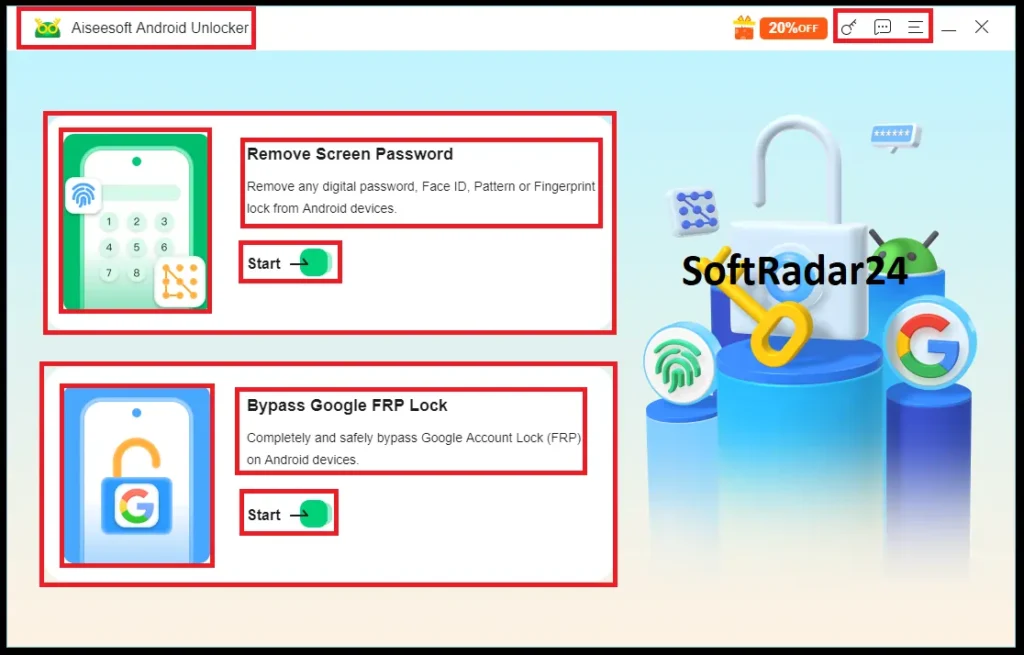
The desktop application separates two jobs on its main dashboard: Remove Screen Password and Bypass Google FRP Lock. Keep them separate because screen-lock removal and post-reset Google verification have different compatibility boundaries and data implications.
Remove a Forgotten Screen Lock
- Before opening Aiseesoft Android Unlocker, confirm that you own or are authorized to service the Android device and back up any data you can still reach.
- Open Aiseesoft Android Unlocker on the Windows PC or Mac and choose Remove Screen Password.
- Select the correct supported device brand and establish the connection method requested by Aiseesoft Android Unlocker.
- Read the data-loss warning before continuing. The current tutorial states that standard screen-password removal clears phone data.
- Complete the guided removal and set up the device again after the lock has been removed.
Handle Google FRP on a Supported Device
- Use the FRP module only for a device that you own or have authorization to service.
- Choose Bypass Google FRP Lock in Aiseesoft Android Unlocker and confirm that the device family is covered by the current FRP compatibility list.
- Connect the supported device to the computer and follow the model-specific instructions shown inside Aiseesoft Android Unlocker.
- Do not disconnect the device during the guided process; when complete, continue with legitimate device setup.
Before Unlocking a Broken-Screen Phone
- If the display is visible and you know the PIN/password, first try a supported USB mouse, keyboard, DeX or external-display method to access and back up the phone without wiping it.
- Check Google/Samsung cloud backups and removable SD storage before choosing a destructive lock-removal path.
- Use Aiseesoft Android Unlocker only when the screen credential itself prevents access and you accept the data-loss condition that applies to the current model.
Product Interface & Workflow
Aiseesoft Android Unlocker keeps its two main tasks visible on the first screen: Remove Screen Password and Bypass Google FRP Lock. This is useful because it prevents a normal lock-screen problem from being confused with the Google-account verification screen that appears after certain factory resets.
Compatibility & Coverage
Compatibility has two separate layers: the desktop computer that runs Aiseesoft Android Unlocker and the Android device/lock type being handled. The formal device table is more useful than broad marketing language because screen-lock support and FRP support do not cover the same brand set.
| Area | Current documented coverage | Decision note |
|---|---|---|
| Android versions | Android 6.0 and above, including Android 16 | OS support does not mean every model/lock workflow has identical behavior. |
| Screen-passcode brands | Samsung · Huawei · OPPO · realme · Motorola · OnePlus · Vivo | Current formal technical list for removing screen passcodes. |
| FRP brands | Samsung · Xiaomi | Current formal FRP list is narrower than the screen-passcode list. |
| Screen-lock types | PIN · pattern · password · fingerprint · face recognition | Modern-device removal can erase local data. |
| Windows | Windows 11 / 10 / 8.1 / 8 / 7 · 32-bit & 64-bit | Current technical specification. |
| macOS technical table | macOS 10.13 through macOS 27 Golden Gate beta | The page banner separately says Mac OS X 10.7+; trial-test older Macs when compatibility matters. |
| Mac processors | 1 GHz Intel processor and Apple M-series chips including M5 | Current processor coverage. |
| RAM | 1 GB RAM or more | Current published RAM requirement. |
Samsung Lockout Behavior Has Changed
Current Samsung One UI 9 security rules progressively increase lockout periods after repeated wrong credentials. Samsung documents a permanent lock after the 13th failed attempt, requiring a factory reset for reuse. Samsung also states that it cannot remotely view or recover the local screen PIN/pattern/password. Older tutorials that describe a universal remote “unlock my screen” command should therefore not be treated as current guidance for every Galaxy device.
FRP Is Ownership Verification After a Reset
Google FRP is designed to stop an erased Android device from being reused by an unauthorized person. After an untrusted factory reset, a protected phone can require a Google Account that was previously synced to the device. The safest ownership-transfer practice is to remove accounts properly before reset or have the previous owner complete the transfer.
Features & Capabilities
Aiseesoft Android Unlocker is deliberately narrower than a full Android repair or data-management suite. Its value comes from handling two lock categories through a guided desktop interface while providing current Android-version and brand-specific compatibility information.
Screen-Lock Removal
- PIN removal
- Pattern-lock removal
- Password removal
- Fingerprint and face-recognition lock removal
- Support for documented Samsung, Huawei, OPPO, realme, Motorola, OnePlus and Vivo devices
Google FRP Workflow
- Separate Bypass Google FRP Lock module
- Formal current FRP support for Samsung and Xiaomi phones/tablets
- Guided model-dependent desktop process
- Intended for legitimately owned/authorized devices after Google-account verification problems
Modern & Legacy Android Coverage
- Android 6.0 through Android 16
- Some early Samsung models can use a no-data-loss screen-lock path
- Modern-device screen-lock removal generally requires accepting local data erasure
- Windows and macOS desktop editions
Guided Connection & Recovery Workflow
- Brand selection for screen-passcode removal
- USB connection plus alternative guided connection methods where offered
- Model-specific instructions presented inside the application
- Clear separation between screen-lock removal and FRP handling
Important Conditions & Limitations
The most important limitation is not speed—it is data loss and lock-type compatibility. Before paying, determine whether your goal is to regain use of the device, preserve local data, clear post-reset FRP on a supported brand, or remove an enterprise restriction that Aiseesoft Android Unlocker is not designed to handle.
Standard Screen-Password Removal Clears Phone Data
The current Aiseesoft Android Unlocker tutorial explicitly warns that the normal Remove Screen Password operation clears phone data. This is the central buying condition for modern phones. A successful unlock can restore use of the hardware while still wiping local photos, messages, apps and other data that was not backed up.
No-Data-Loss Unlocking Is Limited to Some Early Samsung Models
Aiseesoft gives early Samsung devices—such as Galaxy S6-series examples—as the documented exception. Do not generalize that exception to a current Galaxy, Motorola, OPPO, Huawei, realme, OnePlus or Vivo device.
FRP Support Is Not the Same as Screen-Lock Brand Support
The current technical table lists seven brand families for screen-passcode removal but only Samsung and Xiaomi for FRP. If FRP is the only reason you are buying, use the narrower FRP table as the compatibility boundary.
FRP Bypass Does Not Recover Data Erased by the Factory Reset
FRP appears after the device has already been factory-reset. Removing the Google verification barrier does not restore local files that were erased during that reset. Restore backed-up data afterward only if a legitimate backup exists.
Smart Lock Is Now Extend Unlock—and It Must Be Configured Before Lockout
Current Android calls the feature Extend Unlock. Trusted places/devices can keep a phone unlocked for longer after an authorized unlock, but the feature is not a universal forgotten-PIN recovery method. Android can still require the primary credential, especially after restart or stronger authentication events.
Managed Work/School Devices Require Administrator Action
Android MDM can remotely enforce passcodes, lock/wipe devices, manage apps and control settings. Aiseesoft Android Unlocker is not documented for removing an organization’s management enrollment. If the restriction comes from work or school management, contact the administrator.
Broken Screen and Forgotten Password Are Different Problems
If you know the credential but touch input is broken, a supported mouse/keyboard, DeX/external-display or cloud-backup path can preserve data without removing the lock. A destructive screen-lock removal should not be the first option merely because the glass is damaged.
Device Marketing Counts Are Not a Per-Model Guarantee
Aiseesoft advertises support across thousands of Android models. Real unlocking still depends on the exact brand, model, Android build, chipset, connection path and lock type. The formal technical compatibility table is the safer reference point for a purchase decision.
Free Download Does Not Mean Every Unlock Feature Is Free
Aiseesoft provides a free download, while the current tutorial states that registration enables all features. No reliable numeric free-trial unlock allowance is published in the supplied current technical pages, so do not assume the download can complete your exact screen-lock or FRP job without registration.
The 30-Day Money-Back Promise Is Tied to Quality Problems
Current technical pages advertise a 30-day money-back guarantee when there is a quality problem. That is different from an unconditional “any reason” refund. Compatibility and data-loss conditions should be checked before purchase.
Free Trial / Free Version
Aiseesoft provides Windows and Mac free downloads, but the supplied current Android Unlocker pages do not publish a dependable numeric allowance for completing screen-lock or FRP removal without registration. The tutorial explicitly says registration unlocks all features.
| What to check | Why it matters | Best pre-purchase check |
|---|---|---|
| Device brand | Screen-lock and FRP brand lists are different. | Match your exact task to the formal screen-passcode or FRP support table. |
| Android version | Android 6.0–16 is documented, but model behavior can still vary. | Confirm the current application recognizes your phone and presents the expected workflow. |
| Data-loss warning | Modern screen-lock removal can wipe local data. | Do not continue unless you accept the wipe or have already backed up what you can. |
| Computer compatibility | The unlocker runs from Windows or macOS. | Install the correct desktop edition and verify that the phone can communicate with the computer. |
| Lock type | Screen password, FRP, MDM and SIM locks are different. | Choose the product only when your actual lock is one the application documents. |
System Requirements
The desktop requirements are modest. Compatibility with the Android phone itself is more important than raw computer performance.
| Requirement | Current documented value | Decision note |
|---|---|---|
| Windows | Windows 11 / 10 / 8.1 / 8 / 7 · 32-bit & 64-bit | Current technical table. |
| macOS | macOS 10.13 through macOS 27 Golden Gate beta | Current technical table; page banner separately says Mac OS X 10.7+. |
| Android | Android 6.0 and above, including Android 16 | Exact model/lock support still depends on the device table. |
| Windows CPU | 1 GHz Intel/AMD CPU or above · 32-bit or 64-bit | Current minimum processor specification. |
| Mac CPU | 1 GHz Intel processor or Apple M-series chip including M5 | Current documented processor support. |
| RAM | 1 GB or more | Current published RAM requirement. |
| Connection | Computer-to-phone connection required for normal guided workflows | Broken/dead devices that cannot communicate with the computer may need another recovery path. |
Alternatives & Better-Fit Options
Choose another Aiseesoft tool when the problem is data recovery or backup rather than removing a lock. For the broader Aiseesoft catalog and current offers, visit the Aiseesoft software page on SoftRadar24.
FoneLab Android Data Recovery
Choose this when the phone is accessible enough for a data-recovery workflow and the real problem is deleted contacts, messages, photos or other Android data—not a forgotten screen credential or post-reset FRP barrier.
FoneLab iPhone Data Recovery
A better fit when the missing information is on an iPhone/iPad or an iOS backup. Android screen-lock removal and iOS data recovery are separate workflows.
FoneLab Android Data Backup & Restore
Use this proactively while an Android phone is still accessible. A current backup is the best protection against the data wipe that can accompany modern screen-lock removal.
FoneLab iOS Data Backup & Restore
Relevant for iPhone/iPad backup workflows rather than Android unlocking. Choose according to the device ecosystem and whether your real objective is preserving data or regaining access.
FAQ
These answers focus on the buying questions that change whether Aiseesoft Android Unlocker is suitable: price, data loss, Android 16, supported brands, Samsung lockouts, broken screens and Google FRP.
What is the current Aiseesoft Android Unlocker coupon code and discount?
SoftRadar24 currently applies a 50% Aiseesoft Android Unlocker coupon discount automatically through the approved purchase links. Current Windows and Mac prices are $14.95 for 1 Month, $39.96 for 1 Year and $37.47 for Lifetime.
Does Aiseesoft Android Unlocker erase phone data?
For standard screen-password removal, the current tutorial says the process clears all phone data. Aiseesoft documents no-data-loss removal only for some early Samsung models, including Galaxy S6-series examples. Modern-device buyers should assume local data loss unless their exact model is covered by a documented exception.
Can Aiseesoft Android Unlocker unlock Android without a factory reset?
The software automates screen-lock removal rather than asking you to manually perform a factory reset, but that does not mean modern phone data is preserved. The current guide still warns that standard screen-lock removal clears the phone.
Which Android brands are supported for screen-password removal?
The current formal technical table lists Samsung, Huawei, OPPO, realme, Motorola, OnePlus and Vivo phones/tablets for screen-passcode removal.
Which brands are supported for Google FRP removal?
The current formal Aiseesoft Android Unlocker FRP table lists Samsung and Xiaomi phones/tablets. Do not assume that every brand supported for screen-passcode removal is also covered for FRP.
Does Aiseesoft Android Unlocker support Android 16?
Yes. Current technical specifications document Android 6.0 and above, including Android 16. Exact model, chipset and lock-type compatibility can still differ.
What should I do after too many wrong PIN attempts on a Samsung phone?
Stop repeated guessing if you no longer know the credential. On One UI 9, Samsung progressively increases lockout durations and documents permanent lock after the 13th failed attempt, after which factory reset is required. Aiseesoft supports Samsung screen-lock removal, but standard modern-device removal can erase local data.
Can SmartThings Find remotely reveal or remove my forgotten Samsung PIN?
Current Samsung guidance for One UI 9 says Samsung cannot remotely view, retrieve or recover the local screen PIN, pattern or password. SmartThings Find can locate, lock and erase devices, but older “remote unlock” tutorials should not be assumed to apply to every current Galaxy model/software version.
Can Aiseesoft Android Unlocker help with a broken touchscreen?
It can be relevant when the lock itself prevents access and the phone can still communicate with the computer. If the display is visible and you know the PIN, first try a supported USB mouse/keyboard or external-display backup method because screen-lock removal may erase local data.
Is Google FRP the same as an Android screen lock?
No. A screen lock protects ordinary day-to-day device access. FRP is Google ownership verification that can appear after a protected device is factory-reset. Aiseesoft Android Unlocker provides separate modules for these two tasks.
Can Aiseesoft Android Unlocker remove an MDM work or school restriction?
Android Unlocker is not documented as an Android enterprise-MDM removal product. Managed-device restrictions are controlled by the organization’s management system, so contact the administrator responsible for enrollment.
Is there a free version of Aiseesoft Android Unlocker?
Aiseesoft provides free Windows and Mac downloads. The current tutorial says registration enables all features, while the supplied current pages do not publish a reliable numeric allowance for completing an unlock or FRP job for free.
Why is the Lifetime license cheaper than the 1-Year license?
That is how the current SoftRadar24 offers are priced: Lifetime is $37.47, while 1 Year is $39.96. If you expect to keep Aiseesoft Android Unlocker, the current Lifetime offer provides the longer term at the lower listed price.
What is the Aiseesoft Android Unlocker refund period?
Current Aiseesoft technical pages advertise a 30-day money-back guarantee when there is a quality problem. Compatibility and data-loss conditions should be reviewed before purchasing.





