You bought a new Amazon Kindle, downloaded an EPUB file, connected your device via USB, and copied the book. But when you disconnect the cable, the book is nowhere to be found. Sound familiar?
Amazon Kindle system is notoriously strict when it comes to file compatibility. If you are tired of format errors, missing book covers, and “unsupported file” warnings, you are in the right place. In this guide, we will cut through the confusion and show you exactly which formats work, why your files are failing, and how to fix them permanently.
🎁 Verified 2026 Deal: Epubor eBook Converter Promo Code
Ready to fix those Kindle format errors? Stop wasting time on fake coupon sites. Clicking our exclusive links automatically applies your verified discount code directly at the official checkout.
Did Kindle Stop Supporting EPUB Files?
This is the biggest confusion in the e-reader community today. Here is the blunt truth: Kindle e-readers have never natively supported EPUB files. Wait, but Amazon announced EPUB support, right? Yes and no. Amazon updated its “Send to Kindle” email and web service to accept EPUBs. However, when you upload an EPUB through their cloud, Amazon’s servers secretly convert it into a proprietary Kindle format (like AZW3) before sending it to your device.
If you try to drag and drop an EPUB file directly into your Kindle’s documents folder using a USB cable, your Kindle will completely ignore it.
Why Can’t I Read EPUB Files on My Kindle Directly?
Because EPUB is an open-source format used by Apple Books, Kobo, and Google Play. Amazon, on the other hand, operates a closed system. They want you to buy books directly from the Kindle Store. By blocking native EPUB support via USB, Amazon forces you to either use their cloud conversion tool (which often ruins book formatting and covers) or buy the book again from them.
Are Kindle Files EPUB or MOBI?
Neither. Historically, MOBI was the standard format for early Kindles. However, as of late 2022, MOBI is officially dead. Amazon no longer supports sending MOBI files to your library.
Today, modern Kindle files use advanced typography and are delivered in two main proprietary formats:
- AZW3 (Kindle Format 8): The standard format for most sideloaded books.
- KFX: Amazon’s newest and most advanced format, offering enhanced typesetting, better hyphenation, and continuous scrolling.
How Do I Add a KFX or AZW3 File to My Kindle?
If you have a native AZW3 or KFX file, adding it is incredibly simple. Just connect your Kindle to your PC or Mac using a USB cable, open the Kindle drive, and drag the file directly into the documents folder. Disconnect safely, and your book will appear with its original cover and flawless formatting.
But here is the real problem: What if your entire library consists of EPUB, PDF, or outdated MOBI files?
The Ultimate Fix: Stop Relying on Amazon’s Broken Cloud
If you have hundreds of EPUBs, using Amazon’s “Send to Kindle” feature is a nightmare. It strips away high-quality book covers, breaks chapter alignments, and limits your file size to 200MB.
To take full control of your library, you need to convert your EPUBs and PDFs into native AZW3 or KFX formats locally on your computer, before sending them to your Kindle.
Epubor eBook Converter: Supported Formats & Tech Specs
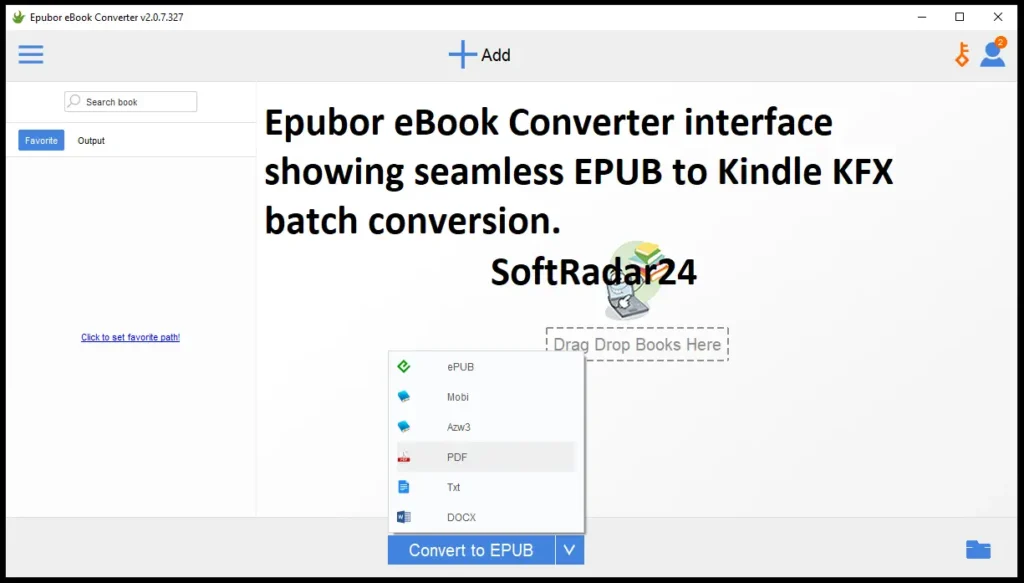
Core Specifications
- Official Retail Price: $19.99 (Exclusive SoftRadar24 discount automatically applied at checkout).
- Supported Operating Systems: Windows 10 / Windows 11, and macOS 10.14 or later.
- Processing Engine: Powered by eCore Technology (Delivers up to 60X faster batch conversion speed).
- Supported Input Formats: KFX, EPUB, PDF, AZW, AZW1, AZW3, AZW4, MOBI, PRC, TPZ, Topaz, TXT, HTML.
- Supported Output Formats: EPUB, MOBI, AZW3, TXT, PDF.
- Current Version: V2.0.7.327 (Last Updated: December 27, 2024).
Epubor eBook Converter: Free Trial vs. Paid License
Thinking about using the free trial? Before you spend hours downloading and installing, here is the official breakdown of the trial limitations versus the unlocked premium version.
| Feature | Free Trial Version | Paid License (SoftRadar24 Deal) |
|---|---|---|
| Conversion Length | Converts only 20% of the book | 100% Full Content conversion |
| Output Quality & Images | Forced to TXT format (Loses covers, images, and formatting) | Original Quality (Keeps HD covers, fonts, and layout) |
| Batch Processing | Highly restricted | Unlimited (60X Faster eCore Engine) |
| Edit Metadata | Disabled | Enabled (Fix author names & covers) |
Epubor eBook Converter Discount Coupon Codes (2026)


Stop wasting time testing expired promo codes on random coupon sites. Below are the only officially verified and active Epubor discount links for 2026, automatically applied at checkout for our readers.
Before you claim your discount, make sure you choose the exact software you need to avoid wasting your money:
Option 1: If your downloaded files are completely DRM-free and you only need to change their format to AZW3 or KFX for your Kindle, claim the eBook Converter deal below.
Epubor eBook Converter (Batch Format Tool)
Stop fighting with format errors. Epubor eBook Converter is the fastest local software for Windows and Mac that transforms any EPUB, PDF, or MOBI file into perfect AZW3 or KFX formats in seconds. Batch Conversion: Convert dozens of books at once.
- No Formatting Loss: Keeps your original covers, table of contents, and layouts 100% intact.
- Edit Metadata: Fix wrong book titles or author names before sending them to your device.
Note: This tool is for DRM-free books. If your files are encrypted, you will need Epubor Ultimate.
Epubor eBook Converter for Windows – 20% OFF
Epubor eBook Converter (1-Year License / Windows)
Ideal for Single Projects: Convert your DRM-free e-book collection to AZW3 or KFX formats securely on your Windows PC for a full year.
Epubor eBook Converter (Lifetime License / Windows)
Best Value for Readers: Get permanent access to blazing-fast format conversions and future updates on one Windows computer without subscription fees.
Epubor eBook Converter (Family Lifetime / Windows)
Perfect for Households: Install this powerful conversion engine on up to 5 Windows PCs permanently and share your library across all devices.
Epubor eBook Converter for Mac – 20% OFF
Epubor eBook Converter (1-Year License / Mac)
Quick macOS Setup: Seamlessly transform your unencrypted EPUBs into Kindle-ready files directly from your Mac for 12 months.
Epubor eBook Converter (Lifetime License / Mac)
One-Time Investment: Break free from recurring costs and enjoy lifetime format conversions directly within your macOS ecosystem.
Epubor eBook Converter (Family Lifetime / Mac)
Ultimate Apple Household: Equip up to 5 Mac computers with permanent access to the fastest e-book format modifier on the market.
Option 2 (Highly Recommended): If your books were purchased from Amazon, Kobo, or Google Play, they are DRM-encrypted. The basic converter will fail to open them. To permanently strip the encryption and convert the formats simultaneously, you must grab the Epubor Ultimate discount instead.
Epubor Ultimate for Windows – 20% OFF
Epubor Ultimate (1-Year License / Windows)
Perfect for Quick Fixes: Unlock your newly purchased e-reader library with a full year of DRM removal and format conversion on your PC.
Epubor Ultimate (5-Year License / Windows)
Best Value Choice: Secure half a decade of uninterrupted software updates to easily bypass the newest Kindle and Kobo DRM protections.
Epubor Ultimate (Lifetime License / Windows)
Buy Once, Read Forever: Get permanent access and lifetime technical support without ever paying another recurring subscription fee for your PC.
Epubor Ultimate for Mac – 20% OFF
Epubor Ultimate (1-Year License / Mac)
Instant Mac Conversion: Quickly convert your Amazon or Apple books into standard formats for one full year on your macOS environment.
Epubor Ultimate (5-Year License / Mac)
Long-Term Mac Solution: Keep your Apple computer fully equipped to handle evolving eBook security updates and strict DRM rules for the next five years.
Epubor Ultimate (Lifetime License / Mac)
Ultimate Mac Freedom: Enjoy permanent DRM removal capabilities and direct access to specialized macOS technical support for life.