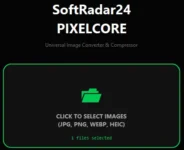
Image Converter: Convert Image to Any Format for Free. Compress images at the best quality, for free! Compress WebP, PNG and JPEG images intelligently.
Image Converter & Compression Free Protable Tool
In a digital world full of photos, finding a reliable way to manage your files can be a challenge. Whether you need to reduce image size in KB for a quick email or you are looking for the best image converter & compression tool to organize your library, you shouldn’t have to compromise your privacy. SoftRadar24 PixelCore is a dedicated image compressor offline free tool built for those who want professional results without ever uploading a single byte to the internet.
What is image format conversion and why is it done?
At its simplest, image conversion is the process of changing a file from one format to another—like turning a heavy PNG into a web-friendly JPG or a modern WebP. We do this because different devices and platforms have different requirements. You might need a specific format for a government application, a professional portfolio, or simply to ensure your friends can open the “unsupported file” you just sent them. It’s all about making your digital life more flexible and compatible.
What is image compression and why is it useful?
Image compression is the art of shrinking a file’s “weight” (the KB or MB) without noticeably losing its visual beauty. It is incredibly useful because smaller files are faster to share, take up less space on your hard drive, and help websites load at lightning speed.. If you have ever struggled with a “file too large” error while uploading a document or a photo, you know exactly why a high-quality WebP compressor or a general image optimizer is a must-have in your digital toolkit.
🎓
The Science Behind Image Optimization
Balancing file size and visual fidelity is essential for professional results. While SoftRadar24 PixelCore automates this process for you, understanding the core principles is valuable. To learn more about the industry standards, you can explore the fundamentals of how to compress images properly. We bring that same professional-grade efficiency to your desktop, for free.
Your Private Photos Belong on Your Computer, Not a Stranger’s Server
We share the same concern: why should you have to upload private family portraits or sensitive office documents to an “online image converter” just to change their size? Online tools often store your data on their servers, creating a huge privacy risk. We believe your memories are yours alone. That is why we developed a solution that stays on your desk, works 100% offline, and never asks for your personal information. SoftRadar24 PixelCore Image Converter & Compression Free Tool: No accounts, no uploads, just pure privacy.
SoftRadar24 PixelCore: What is it and how does it help?
SoftRadar24 PixelCore Image Converter & Compression Free Tool is a powerful, all-in-one utility designed for home users, office professionals, and web content creators who need speed and security. This image converter & compression free tool is completely portable, meaning it requires no installation and leaves no “trash” on your Windows system. In just seconds, you can batch-process hundreds of photos, converting formats and compressing sizes simultaneously to save massive amounts of disk space. It is built to be “plug-and-play” simple, ensuring that even if you aren’t a tech expert, you can get professional-grade results instantly.
🛡️
Maximize Your PC Performance
Looking for more lightweight utilities? Discover NetShield, our Free Portable Ad Blocker for Windows designed to stop tracking without any installation. Experience a cleaner, faster, and distraction-free internet by downloading the ultimate Free Ad Blocker for Windows today.
How to use SoftRadar24 PixelCore
Getting started is easy. Follow these simple steps to master your media:
Download: SoftRadar24 PixelCore Image Converter & Compression Free Tool
Launch the tool: Double-click the SoftRadar24_PixelCore.exe file.
Grant Access: When the Windows UAC (User Account Control) window appears, simply click “Yes” to allow the tool to run.
Select Your Images: Click inside the central box in the application window to browse and select the image (or multiple images) you wish to process.
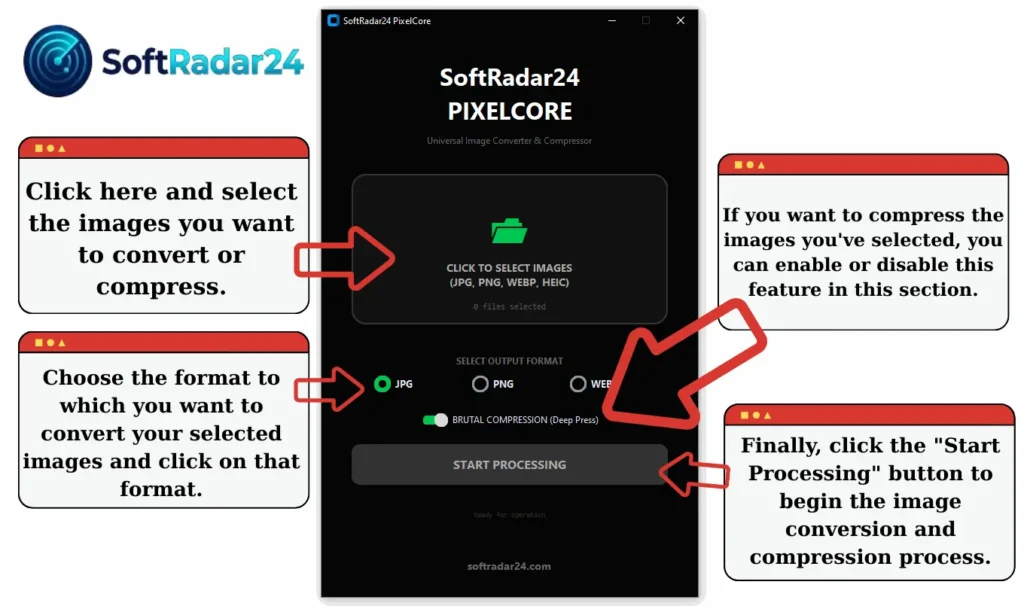
Choose Your Settings: Select your desired output format (including the iPhone-friendly HEIC to JPG/WebP conversion) and set your compression level.
Finish: Click the “Convert & Compress Now” button.
Review: In a few seconds, a notification will appear saying the process is complete. Click “OK”, and the program will automatically open the folder containing your newly optimized images.
| Property | Value |
| File Name | SoftRadar24_PixelCore.exe |
| Version | v1.0 (Stable / Portable) |
| File Size | ~33.4 MB |
| Release Date | Feb 13, 2026 |
| SHA-256 Checksum | E0787FEF96F3E7D404ADFA28E97F81751FEA71BA3F42EDCAF026B18F8429465B |
| VirusTotal Scan | View VirusTotal Scan Results |
Disclaimer & Terms of Use
This software is provided “as is” and is intended for personal and professional use at the user’s own risk. By using this free tool, you acknowledge that SoftRadar24 cannot be held liable for any direct or indirect issues, data loss, or system errors that may occur. While we strive for perfection and 100% security, the responsibility for the use of this utility lies solely with the user. SoftRadar24 PixelCore Image Converter & Compression Free Portable Tool is a standalone, offline application designed to respect your privacy and provide a clean, ad-free experience.
Frequently Asked Questions (FAQ)
What makes SoftRadar24 PixelCore different from other tools?
SoftRadar24 PixelCore Image Converter & Compression Free is designed as a lightweight, all-in-one utility that combines speed and privacy. Unlike online tools that require you to upload your personal photos to a server, PixelCore processes everything locally on your PC. It is a powerful Image Converter that supports bulk processing without limits, ensuring your data never leaves your device.
Does the Image Converter & Compression Free feature reduce photo quality?
Our priority is “Intelligent Compression.” When you use the Compression Free feature, the software analyzes the image to reduce file size significantly while maintaining the highest possible visual quality. You can adjust the compression levels manually to find the perfect balance between size and clarity, making it ideal for web developers and photographers.
Which file formats does SoftRadar24 PixelCore support?
SoftRadar24 PixelCore Image Converter & Compression Free Tool is built to handle the most popular modern formats. You can easily import and convert files between JPG, PNG, WebP, BMP, HEIC and TIFF. Whether you need to convert a transparent PNG to a lightweight WebP or turn a high-quality BMP into a shareable JPG, our Image Converter handles it instantly.
Is SoftRadar24 PixelCore completely free to use?
Yes, absolutely. SoftRadar24 PixelCore Image Converter & Compression Free Tool is 100% free software. We believe in providing essential utilities without hidden costs. You get full access to the Image Converter & Compression Free tools without watermarks, trial periods, or subscription fees. It is clean, powerfull software.
Do I need to install the software to use it?
No installation is required. SoftRadar24 PixelCore Image Converter & Compression Free Tool is a portable application. This means you can download the single .exe file, save it to a USB drive, and run it on any Windows computer immediately. It doesn’t leave junk files in your registry, keeping your system clean and fast.