
Quick Summary
Hard Disk Sentinel Professional is Windows disk-health monitoring and diagnostic software for HDDs, SATA and NVMe SSDs, SSHDs, RAID-connected drives, USB storage and other supported media. It combines continuous S.M.A.R.T. monitoring, temperature and performance tracking with textual health explanations, alerts, disk tests and Professional-only tools such as complete surface analysis, Quick Fix for weak-sector problems, NAS monitoring, scheduled or problem-triggered backups, Portable diagnostics and WMI/XML status output. It is most useful when you want to understand whether a drive is stable before data loss occurs—not merely read a single S.M.A.R.T. ‘OK’ flag.
- Current Windows release
- Stable v6.40 · separate beta/test v6.40.3 currently offered
- Primary use
- HDD / SSD / NVMe health monitoring, diagnostics and failure warning
- Professional-only depth
- Surface repair/reinitialization, Quick Fix, NAS, Portable, scheduled/panic backup, WMI/XML
- License model
- Lifetime use with free updates to future versions of the same edition
Purchase Options
License & Purchase · Hard Disk Sentinel · 40% OFF Coupon Code
If you searched for a Hard Disk Sentinel coupon code or Hard Disk Sentinel Professional discount code, the SoftRadar24 purchase buttons below preserve the existing promotional checkout links. Choose Standard for core monitoring, Professional for the full diagnostic / backup toolset, or Professional Family for up to five computers.
Hard Disk Sentinel Standard — Lifetime
1 PC · Lifetime use · free updates to future Standard versions
Included with this license- Core HDD / SSD / NVMe health, S.M.A.R.T. and temperature monitoring
- Hardware short / extended tests, seek and stress tests, alerts and reports
- Standard surface checks and WebStatus access
- Lifetime use with free updates to future versions of the Standard edition
Regular: US$22.00
US$13.20one-time
Coupon code automatically applied
Buy NowHard Disk Sentinel Standard — Lifetime
Best fit when you mainly want continuous drive-health monitoring, alerts and standard diagnostic tests. Professional adds the deeper surface-repair, NAS, Portable and backup automation features.
The current official store lists regular lifetime prices of US$22 for Standard, US$33 for Professional and US$59 for Professional Family (5 PCs). These SoftRadar24 campaign links currently apply a 40% discount. Applicable tax is added according to your billing location; verify the final checkout before payment.
Can This Software Do What I Need?
Hard Disk Sentinel is valuable when the question is more specific than ‘is my drive visible in Windows?’. The decision points below separate continuous health monitoring, SSD wear, bad/weak sector investigation, NAS monitoring and real backup or partition-management jobs.
I want to check whether my SSD, NVMe SSD or hard drive is healthy
SSD / HDD health check
YesHard Disk Sentinel reads available S.M.A.R.T. data, reports health and temperature, explains detected problems in text and can track degradation over time. SSD health can reflect both wear and actual error conditions when the drive exposes the relevant data.
My drive shows 90% health and some reallocated sectors — must I replace it now?
Health percentage interpretation
Not automaticallyThe vendor FAQ says already reallocated sectors are no longer used and a drive may remain stable with less than 100% health. The important warning sign is growth in the problem count or a continuing health decline. Back up important data and verify stability before deciding.
I want to find and repair weak sectors
Weak-sector diagnosis
Professional has deeper toolsProfessional adds complete surface analysis and Quick Fix. Some tests can force weak sectors to become stable or trigger drive-managed reallocation, but software cannot physically heal scratched media or failed hardware.
I want to test the entire disk surface before trusting a used or suspicious drive
Deep surface testing
YesUse short/extended self-tests and read-only surface tests first. Professional also provides write-based surface operations, but some of those deliberately overwrite data and must never be treated as harmless scans.
I want to monitor SSD wear and understand TBW / remaining life
SSD endurance monitoring
Yes — when the SSD reports the dataHard Disk Sentinel can interpret drive-specific SSD health and wear information. TBW is an endurance indicator, but any estimated remaining lifetime should be treated as an estimate rather than a guaranteed failure date.
I need to monitor disks inside a NAS
NAS drive monitoring
ProfessionalThe current product comparison lists NAS monitoring as a Professional feature. Actual visibility still depends on the NAS, controller and method used to expose disk status.
I want an automatic backup to start when disk health becomes critical
Problem-triggered backup
ProfessionalProfessional supports scheduled backup projects and panic backup triggered by a disk problem. This is useful for selected data, but it should not be confused with a complete system-imaging or disk-cloning platform.
I need a USB tool to diagnose several computers without installing Hard Disk Sentinel
Portable diagnostics
Professional PortableThe Portable edition can run from removable media and includes the Professional diagnostic/test feature set, but it does not provide the installed version’s continuous real-time protection, Windows startup or service-mode functions.
Hard Disk Sentinel says my drive may be failing and I need a full Windows image or clone
System imaging / migration
Better fit: backup softwareHard Disk Sentinel tells you about storage health and Professional can run backup projects, but a dedicated imaging / cloning product is the clearer fit when the next job is moving the full Windows system to another disk.
I need to resize partitions, move partitions or change disk layout
Partition management
Better fit: partition softwareDisk-health monitoring and partition management are different jobs. Use a dedicated partition manager when the problem is capacity layout, resizing or partition conversion rather than the physical health of the drive.
How It Works
A useful Hard Disk Sentinel workflow has three layers: continuous monitoring while the system is healthy, deeper diagnostics when a value changes, and Professional-only response actions when a drive needs active testing, alerts or backup.
Monitor Health, Temperature and S.M.A.R.T. Continuously
Hard Disk Sentinel reads the status information that supported drives and controllers expose, then converts it into health, performance, temperature and textual diagnostic information. It can also watch for changes and issue alerts instead of requiring you to remember to run a manual SSD health check.
- Select a detected HDD, SSD, NVMe SSD or other supported storage device.
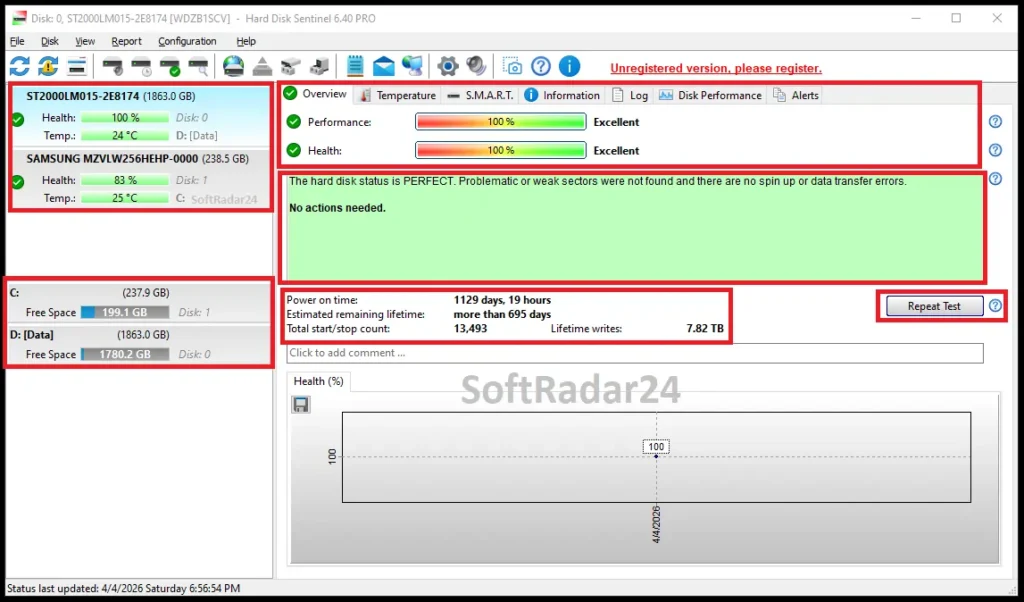
- Read the Overview text together with Health, Performance, temperature, power-on time, lifetime writes and the available S.M.A.R.T. attributes.
- Watch the trend over time; a stable imperfect value and a rapidly worsening value are different situations.
Investigate a Health Drop Safely
The vendor’s FAQ recommends protecting the data before deep diagnostics, then moving from less invasive tests to more invasive ones. That order matters because a suspicious drive may already be close to failure.
- Back up important files immediately when health changes or new errors appear.
- Use the short self-test, extended self-test and a read-only surface test to verify stability without intentionally overwriting the disk.
- Use write-based repair / reinitialization tests only when their data-loss behavior is understood and the disk is an appropriate target.
| Test / Method | Use it when | Important condition |
|---|---|---|
| Short self-test | Quick hardware check of internal components. | Does not scan the entire disk surface. |
| Extended self-test | You want a more complete hardware test with surface verification. | A failing drive may stop the test when an error is encountered. |
| Surface Read test | You want to reveal slow or problematic areas without deliberately erasing data. | Diagnostic, not a repair pass. |
| Reinitialize disk surface | You deliberately want a write-based regeneration / verification process. | Destructive: it overwrites stored information and is not for the active primary system drive. |
Use Professional Automation When a Problem Appears
Professional adds actions that go beyond passive monitoring: custom thresholds, scheduled hardware tests, NAS monitoring, problem-triggered backup, scheduled backup projects, Portable diagnostics and status output for other monitoring systems.
- Configure health / temperature thresholds and the alerts that matter for the machine.
- For critical data, configure a backup action that can run when a drive problem is detected.
- For administration or integration, use service mode, WebStatus, WMI/XML or supported community integrations as appropriate.
Product Interface & Workflow
The images below are reused from the existing SoftRadar24 Hard Disk Sentinel article. The dashboard capture is our own SoftRadar24 screenshot of Hard Disk Sentinel 6.40 PRO; no vendor-hosted screenshot is introduced.
Compatibility & Coverage
Hard Disk Sentinel supports an unusually broad range of Windows generations and storage interfaces, but ‘supported drive’ does not always mean every enclosure or RAID controller exposes full S.M.A.R.T. data. The controller, USB bridge, firmware and driver can determine how much health information is visible.
Windows & Separate Free Editions
| Item | Coverage / Support | Notes |
|---|---|---|
| Windows desktop | Windows 11, 10, 8.1, 8, 7, Vista, XP and several older Windows generations | The current OS compatibility matrix lists Windows 98/98SE onward except Windows 95, plus current Windows 11 support. |
| Windows Server | 2003, 2008, 2012, 2016, 2019 and 2022 families listed | Professional can also run as a service, including when no user is logged in. |
| DOS | Separate Hard Disk Sentinel DOS edition — free | Runs under DOS / boot media, not inside a Windows DOS box. Useful when Windows storage drivers block hardware information. |
| Linux | Separate Hard Disk Sentinel Linux edition — free | This is a separate tool, not the Windows Professional GUI. |
Storage Hardware & Visibility
| Item | Coverage / Support | Notes |
|---|---|---|
| Internal HDD / SSD / SSHD / NVMe | Supported across IDE/SATA/SCSI/SAS/NVMe interfaces | Exact S.M.A.R.T. attributes depend on what the drive exposes. |
| USB / external storage | Broad support | Some older or limited USB bridge chips / enclosures may hide temperature, health or other S.M.A.R.T. information. |
| RAID | Many RAID controllers supported | Some hardware RAID controllers hide physical-drive status and cannot expose full S.M.A.R.T. details to any software. |
| NAS | Professional | Current product comparison lists NAS monitoring as a Professional feature; the NAS/controller must expose compatible status information. |
| LTO / industrial SD / eMMC | Additional Professional coverage where supported | The current homepage explicitly mentions LTO, industrial (micro) SD and eMMC status support in Professional. |
Features & Capabilities
The useful way to read the feature list is by job: understand the drive, prove whether it is stable, react to a problem, and integrate the result into a larger monitoring or backup workflow.
Health, S.M.A.R.T. & Performance Monitoring
- Health and performance percentages with textual diagnostic explanation
- S.M.A.R.T. attributes, Extended S.M.A.R.T. information and change/degradation tracking
- Current, maximum and average temperature monitoring where the device exposes sensors
- Real-time disk transfer-rate monitoring and disk-related Windows event monitoring in Professional
Disk Tests & Professional Repair Tools
- Hardware short and extended self-tests
- Seek-time, stress and surface tests
- Professional complete surface analysis, refresh, reinitialization and repair operations
- Professional Quick Fix for supported weak-sector problems plus auto-saved test results
Alerts, Backup & Data Protection
- Configurable e-mail, sound, message and other alerts
- Professional custom health / temperature thresholds per drive
- Professional scheduled backup projects and panic backup on detected problems
- Professional scheduled hardware tests, FTP / e-mail transfer, compression and secure data-destruction functions
Portable, NAS & Integration
- Professional Portable edition for diagnostics without installation
- Professional NAS monitoring and Windows disk-event monitoring
- Professional WMI / XML status output for developers and monitoring systems
- Community add-ons include PowerShell examples, Nagios / Checkmk integration and custom icon sets
Important Conditions & Limitations
The strongest Hard Disk Sentinel page is not one that promises to ‘fix every bad sector’. Storage failures have different causes, and some of the most powerful diagnostic functions are intentionally destructive. These conditions matter more than marketing superlatives.
A Lower Health Percentage Does Not Automatically Mean Immediate Replacement
Hard Disk Sentinel’s FAQ explains that already reallocated sectors are removed from normal use and a drive can remain stable below 100% health. A rising reallocated/pending/uncorrectable count or continuing health decline is more important than the number by itself.
Physical Bad Sectors Cannot Be Magically Repaired
Software can test, isolate, refresh or force the drive to re-evaluate weak locations and use spare sectors where the hardware supports reallocation. It cannot erase a physical scratch, repair a failed head or restore damaged flash cells.
Some Professional Surface Tests Deliberately Destroy Data
The Reinitialize disk surface test overwrites the disk with test patterns and reads the result back. The vendor explicitly says it cannot be used as a harmless scan on the primary system drive. Back up first and read each test’s data effect before starting it.
Back Up Before Stressing a Drive Whose Health Has Changed
The vendor FAQ recommends an immediate backup before diagnostics when health drops or a new problem is reported. A drive that is already unstable may deteriorate during a long surface or stress test.
USB Enclosures and RAID Controllers Can Hide Health Data
Hard Disk Sentinel can support the drive while still receiving incomplete information because the USB bridge, RAID controller, firmware or Windows storage driver blocks S.M.A.R.T. passthrough. Trying the trial on the actual hardware is therefore important.
Portable Professional Is for Diagnostics, Not Continuous Protection
The Portable edition does not auto-start with Windows, run in service mode or provide the installed edition’s continuous real-time protection. The vendor also documents specific license conditions when the installed and Portable editions are used together.
CHKDSK and Hard Disk Sentinel Solve Different Problems
CHKDSK is a Windows file-system checking / repair utility. Hard Disk Sentinel is a drive-health and S.M.A.R.T. monitoring tool. The vendor’s SSD guidance says CHKDSK is generally safe on SSDs but usually does not need to be run routinely because SSD controllers already handle many internal tasks.
Hard Disk Sentinel Does Not Replace a Real Backup Strategy
Professional can trigger and schedule backup projects, but monitoring cannot make a failing disk reliable. Once the software reports a worsening condition, the priority is to make or verify a usable copy of the important data before deeper testing.
Free Trial / Free Version
Hard Disk Sentinel is shareware. The current download page provides a v6.40 Trial that is the same base program as an unregistered Professional installation, but some functions are unavailable until registration. Separate free DOS and Linux editions also exist for different environments; they are not substitutes for the full Windows Professional feature set.
| Free access | What you can do | What requires payment |
|---|---|---|
| Hard Disk Sentinel Trial v6.40 | Verify hardware compatibility and view core drive-health, free-space, S.M.A.R.T., status and service-mode information that the trial exposes. | Standard unlocks additional tests, reports, alerts and configuration features; Professional unlocks the complete surface-repair, NAS, Portable, scheduled/panic backup and advanced integration feature set. |
| Free DOS / Linux editions | Hard Disk Sentinel DOS v1.21 can inspect supported IDE/SATA storage from DOS/boot media; the separate Linux edition is also available as a free download. | These are separate utilities and do not provide the complete Windows Professional GUI, continuous Windows service protection or Professional automation. |
System Requirements
The official hardware-requirements page remains extremely lightweight, while the separate current OS compatibility matrix is newer and includes Windows 11 and Server 2019/2022. The table below uses the current compatibility matrix for operating systems and the official requirements page for the hardware baseline.
| Requirement | Supported / Required | Notes |
|---|---|---|
| Operating system | Current compatibility matrix: Windows 11, 10, 8.1, 8, 7, Vista, XP and supported older Windows / Server generations | The current matrix also lists Windows Server 2019 and 2022. Windows 95 is currently marked unsupported even though an older requirements page still mentions it. |
| Processor | Pentium or compatible CPU | Official Professional hardware-requirements baseline. |
| Memory | 64 MB system memory | Official Professional hardware-requirements baseline. |
| Free disk space | 50 MB | Official Professional hardware-requirements baseline. |
| Storage interface | One or more supported ATA / SATA / SCSI / SAS / USB / NVMe M.2 storage devices | Controller, enclosure and bridge-chip compatibility can affect how much health data is visible. |
| Administrator rights | Normally required for direct disk-status access | Professional can run as a Windows service so monitoring and alerts can continue even with a limited user or no logged-in user. |
| Additional runtimes | No .NET, Java or Visual C / Visual Basic runtime required | The vendor explicitly says no additional third-party runtime package is required. |
Alternatives & Better-Fit Options
Hard Disk Sentinel is strongest when the job is understanding storage health and reacting before failure. If the next job is copying, cloning or reorganizing the disk, a different category is the better fit. For Hard Disk Sentinel-specific offers and future updates, visit the Hard Disk Sentinel page on SoftRadar24.
AOMEI Backupper Professional
A better fit when Hard Disk Sentinel warns that a disk is deteriorating and your next priority is creating a full system image, disk backup or clone so Windows and your files can be restored or moved to healthy storage.
AOMEI Partition Assistant Professional
A better fit when the disk itself is healthy but the job is partition resizing, moving partitions, reorganizing capacity or other partition-management work rather than S.M.A.R.T. health monitoring.
FAQ
These questions focus on the points that most often change what a Hard Disk Sentinel health result actually means and whether Standard, Professional or another storage tool is the better choice.
Can Hard Disk Sentinel check SSD and NVMe SSD health?
Yes. Hard Disk Sentinel supports SSD and NVMe storage and can report the health, performance, available S.M.A.R.T. / device-specific information and wear indicators that the drive and controller expose. Some SSDs may not expose every value, such as temperature or power-on time.
Does 90% disk health mean I must replace the drive?
No. Driver health below 100% does not automatically mean immediate replacement. Hard Disk Sentinel’s FAQ explains that already reallocated sectors are no longer used; the more important question is whether the problem count is increasing and the health value is continuing to fall. Keep a current backup and verify stability.
Can Hard Disk Sentinel Professional repair bad or weak sectors?
Professional includes complete surface analysis and Quick Fix for supported disk problems, and write-based tests can force the drive to analyze weak sectors and reallocate unusable locations. It cannot physically repair scratched platters, failed heads or damaged flash cells.
Does Reinitialize disk surface erase data?
Yes. The Reinitialize disk surface test is intentionally destructive: it overwrites the disk with test patterns and reads the surface back. The vendor says it cannot be used as a normal non-destructive scan on the active primary system drive.
What is the difference between Hard Disk Sentinel Standard and Professional?
Standard includes health and S.M.A.R.T. monitoring, hardware tests, reports, alerts, WebStatus and standard surface checks. Professional adds complete surface analysis / repair functions, Quick Fix, NAS monitoring, Portable diagnostics, custom thresholds, scheduled hardware tests, scheduled and panic backup, secure data destruction and WMI / XML status output.
Can Hard Disk Sentinel Professional monitor NAS drives?
Yes. The current official comparison lists NAS monitoring as a Professional feature. Whether full health and temperature data are available still depends on the NAS, controller and the method used to expose the physical drive information.
What is Hard Disk Sentinel Professional Portable?
It is a Professional diagnostic edition that can run from removable media without installation. It includes Professional tests and diagnostic functions, but it does not provide the installed edition’s continuous Windows startup, service-mode and real-time protection features.
Does Hard Disk Sentinel support Windows 11?
Yes. The current official operating-system compatibility matrix lists Windows 11 as supported, along with Windows 10, 8.1, 8, 7 and multiple Windows Server generations including Server 2019 and 2022.
Is Hard Disk Sentinel a replacement for CHKDSK?
No. CHKDSK checks and repairs Windows file-system problems, while Hard Disk Sentinel monitors physical storage health, S.M.A.R.T., temperature, wear and drive-level diagnostic information. The vendor’s SSD guidance says CHKDSK is generally safe on SSDs but does not need to be run routinely.
Is Hard Disk Sentinel Professional a lifetime license?
Yes. The current official store says purchased Standard and Professional licenses grant lifetime use and free updates to future versions of the same license type. A single-PC license may be moved to a new computer as long as it is installed on only one computer at a time; the Professional Family license covers up to five computers.
What can I do with the Hard Disk Sentinel Trial?
The current v6.40 Trial is the unregistered Professional base program with some functions unavailable. It is intended to let you examine the software, see what drive information your hardware exposes and verify compatibility before registration.
Is the Hard Disk Sentinel coupon code applied automatically on SoftRadar24?
Yes. The current SoftRadar24 Standard, Professional and Professional Family checkout URLs already contain the promotional coupon parameters. The three checked campaign links currently reduce the US$22, US$33 and US$59 regular prices to US$13.20, US$19.80 and US$35.40 respectively, before applicable tax.





