

IObit Malware Fighter 14 PRO protects Windows PCs against viruses, spyware, ransomware, Trojans, and other malware threats. It scans suspicious files, running processes, and startup items while monitoring potentially harmful scripts and system activity. Malware Fighter 14 also includes controls for protecting personal files, saved browser passwords, and online privacy.
IObit Malware Fighter 14 PRO Discount Code & Price
IObit Malware Fighter 14 PRO coupon code offers reduce the one-year 1-PC license from $39.95 to $3.89, saving approximately 90%. For users protecting multiple computers, the 3-PC license costs just $0.67 more than the 2-PC option.
IObit Malware Fighter 14 PRO Gift Pack (5-in-1) – 1 Year / 1 PC
5-in-1 Gift Pack / 1 Year / 1 PC
- Protected Folder (1 Year / 1 PC)
- Start Menu 8 PRO (1 Year / 3 PCs)
- IObit Malware Fighter 13 PRO (1 Year / 1 PC)
- IObit Software Updater 7 PRO (1 Year / 3 PCs)
- Smart Defrag 10 PRO (1 Year / 3 PCs)
- Automatic updates to the latest product version.
- Free 24/7 technical support on demand.
Price before coupon
$13.95
$9.07Save $4.88
Buy Now60-day money-back guarantee from purchase date.
IObit Malware Fighter 14 PRO Valuable Gift Pack (5-in-1) – 1 Year / 3 PCs
5-in-1 Gift Pack / 1 Year / 3 PCs
- Protected Folder (1 Year / 1 PC)
- Start Menu 8 PRO (1 Year / 3 PCs)
- IObit Malware Fighter 13 PRO (1 Year / 3 PCs)
- IObit Software Updater 7 PRO (1 Year / 3 PCs)
- Smart Defrag 10 PRO (1 Year / 3 PCs)
- Automatic updates to the latest product version.
- Free 24/7 technical support on demand.
Price before coupon
$16.95
$11.02Save $5.93
Buy Now60-day money-back guarantee from purchase date.
IObit Malware Fighter 14 PRO – 1 Year / 1 PC Coupon Code – 90% OFF
1 Year / 1 Windows PC
- One-year IObit Malware Fighter 14 PRO license for 1 Windows PC.
- License service starts on the purchase date.
- License code is supplied by email after purchase.
- Activate with Enter Code > Register Now.
- A valid purchased license can be transferred to another PC; the 1-PC limit still applies.
- Automatic program and database updates and premium 24/7 technical support.
Regular price
$39.95
$3.89Save $36.06
Buy Now60-day money-back guarantee from purchase date.
IObit Malware Fighter 14 PRO – 1 Year / 2 PCs Coupon Code – 68% OFF
1 Year / 2 Windows PCs
- One-year IObit Malware Fighter 14 PRO license for 2 Windows PCs.
- License service starts on the purchase date.
- License code is supplied by email after purchase.
- Activate each covered PC with Enter Code > Register Now.
- A valid purchased license can be transferred to another PC; the 2-PC limit still applies.
- Automatic program and database updates and premium 24/7 technical support.
Regular price
$46.95
$14.92Save $32.03
Buy Now60-day money-back guarantee from purchase date.
IObit Malware Fighter 14 PRO – 1 Year / 3 PCs Coupon Code – 72% OFF
1 Year / 3 Windows PCs
- One-year IObit Malware Fighter 14 PRO license for 3 Windows PCs.
- License service starts on the purchase date.
- License code is supplied by email after purchase.
- Activate each covered PC with Enter Code > Register Now.
- A valid purchased license can be transferred to another PC; the 3-PC limit still applies.
- Automatic program and database updates and premium 24/7 technical support.
Regular price
$54.95
$15.59Save $39.36
Buy Now60-day money-back guarantee from purchase date.
Get a Free IObit Malware Fighter 14 PRO Giveaway Key
Looking for an IObit Malware Fighter 14.0.0.1766 activation key? Get Free Valid IObit License Keys Here. Simply copy the key and activate it in the official IObit Malware Fighter 14 PRO software. Before using it, make sure the license code is still within its validity period and check any applicable activation or usage limitations.
| Details | Get Valid IObit Malware Fighter 14 PRO Keys for Free |
|---|---|
| IObit Malware Fighter 14 PRO License Code | 1CB63-63842-D8ACA-CF13N |
| License expiration date | December 5, 2026 |

IObit Malware Fighter 14 Free Download
Malware Protection – Supports Windows 11/10/8/7 | IObit Malware Fighter 14 PRO for real-time protection against malware, ransomware, spyware, and Trojans. Keep your PC secure and private.

IObit Uninstaller 16 Free License Key [Giveaway]
IObit Uninstaller Free helps remove any app or program on Windows 11/10/8.1/8/7/Vista/XP. Download the uninstaller for PC free to keep your computer clean, fast, and safe.

Advanced SystemCare 20 PRO Giveaway License Key
Boost Your PC and Free Up Space with Disk Deep Clean. IObit Advanced SystemCare 20 PRO to clean junk files, optimize Windows, speed up your PC, and protect your privacy with AI-powered tools.

IObit Driver Booster 14 Giveaway License Code
Driver Booster 14 PRO scans and fixes outdated or broken drivers with access to 23,000,000+ verified drivers. Improve PC performance and stability.
What Is IObit Malware Fighter 14 PRO?
IObit Malware Fighter 14 PRO organizes its controls into six sections: Home, Scan, Browser Protect, Security Guard, Tools, and Action Center. The Home screen shows the current protection status and alerts users to disabled safeguards, outdated threat definitions, or overdue scans. Users can choose Smart, Full, or Custom Scan and review detected threats before taking action.
Key Features of IObit Malware Fighter 14 PRO
A malware scan checks for existing threats, but it cannot by itself prevent suspicious activity after the scan ends. IObit Malware Fighter 14 PRO uses separate safeguards for ongoing protection, each with different functions and setup requirements. Understanding these differences helps users determine which protections are active and which need additional configuration.
Malware Detection Engines and Script Guard
IObit Malware Fighter 14 PRO combines the IObit Anti-malware Engine with Bitdefender’s detection engine. The new Script Guard checks unfamiliar PowerShell and Python scripts for potentially harmful commands, including changes to system settings and important files.
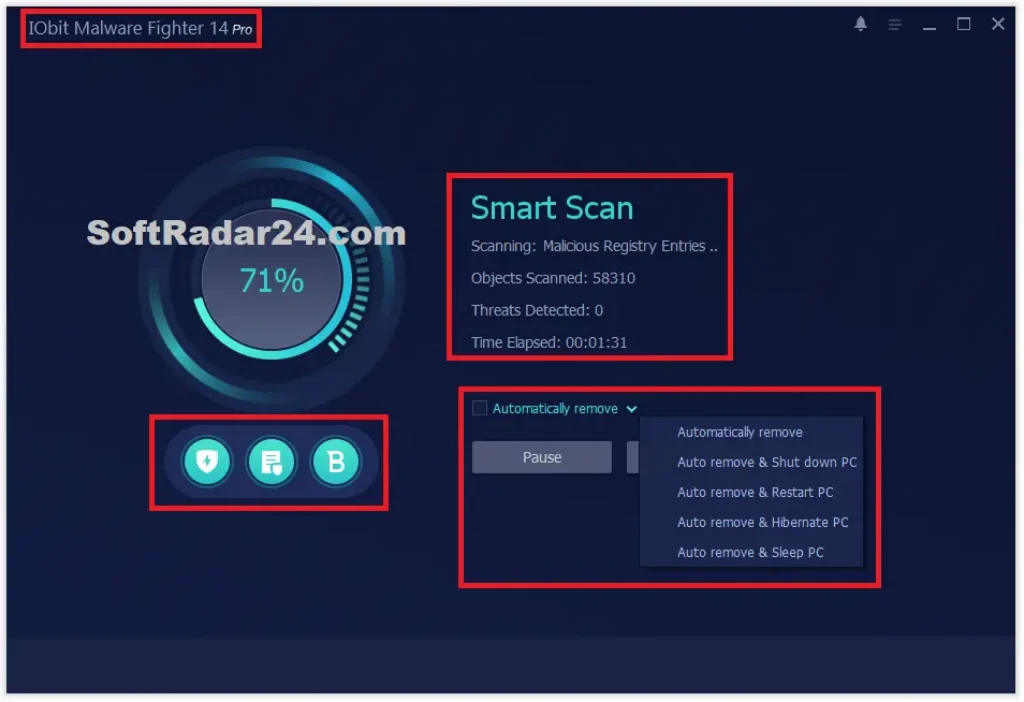
The IObit engine runs by default, but users must enable the Bitdefender engine separately after activating PRO.
Real-Time Security Guards
Under Security Guard > Protection, users can manage individual safeguards for different security risks. File Guard checks unknown files when launched, Camera Guard monitors unauthorized camera access, and USB Disk Guard checks threats from removable drives.
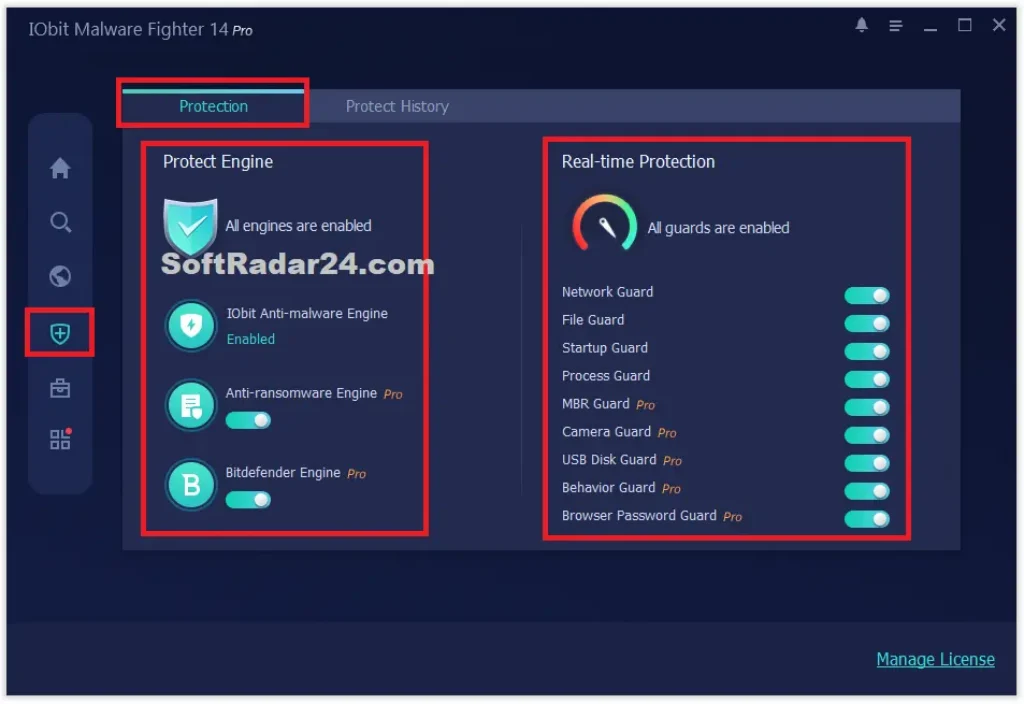
MBR Guard protects the Windows boot record against certain attacks. Protect History shows recent detections and previous security activity.
Ransomware Protection and Safe Box
The Anti-ransomware Engine checks for unauthorized file encryption attempts and must be enabled after PRO activation.
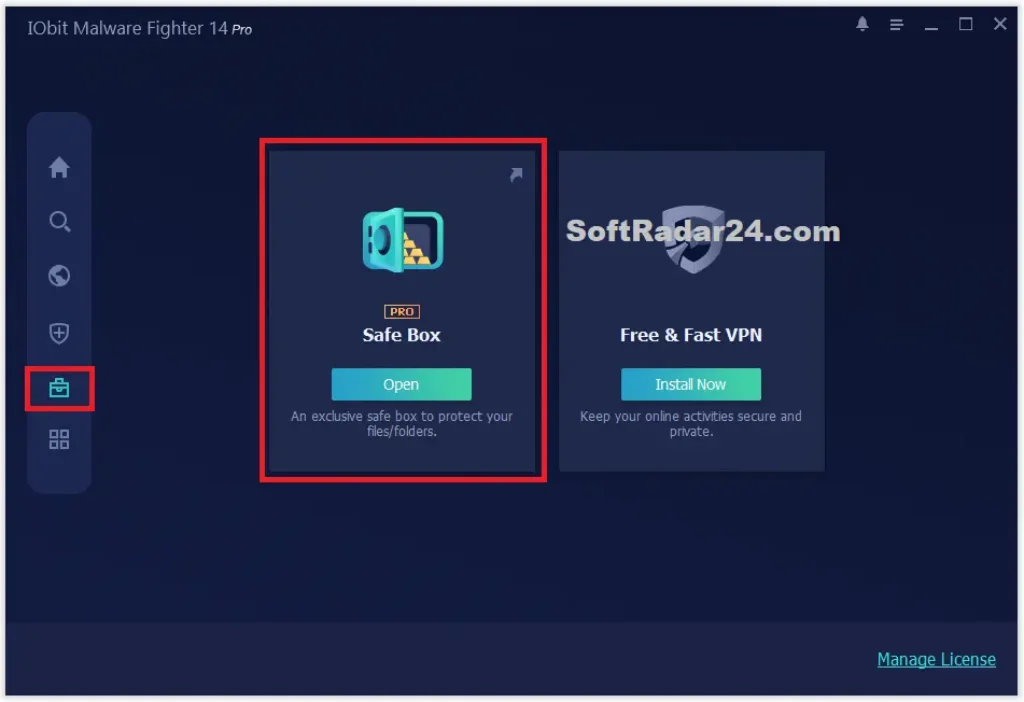
For selected documents and folders, open Tools > Safe Box, add the items to protect, and enable password protection in Settings. Safe Box restricts access to those locations, but it does not replace a separate file backup.
Browser Protection and Privacy Controls
Browser Protect includes Homepage Advisor for detecting unwanted homepage or search engine changes and DNS Protect for monitoring DNS settings.
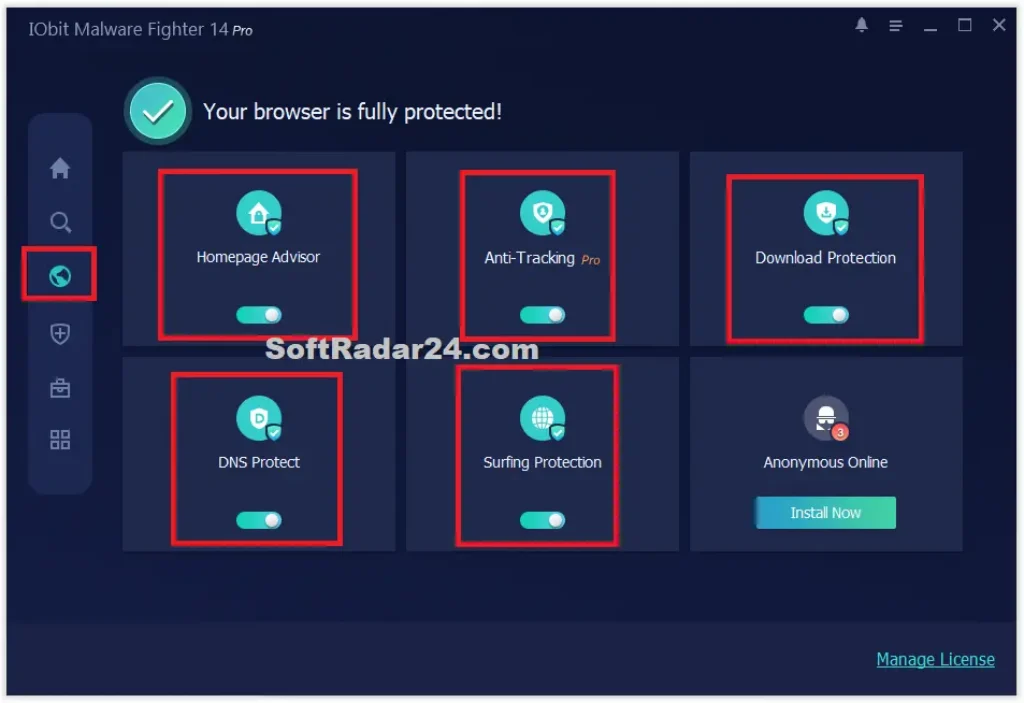
Anti-Tracking removes supported browsing traces when the browser closes, while Download Protection checks downloaded files. Surfing Protection, Ads Removal, and Email Protection require the separate IObit Surfing Protection Extension to work.
IObit Malware Fighter 14 Free vs PRO
IObit Malware Fighter 14 Free is a usable security program, not a time-limited preview of PRO. Purchasing a PRO license expands the available protection and maintenance controls, so the important question is whether the Free edition already covers your requirements.
| Features | IObit Malware Fighter 14 Free | IObit Malware Fighter 14 Pro |
|---|---|---|
| Script Guard | Included | Included |
| Malware Protection Engines | IObit Anti-malware Engine | IObit, Bitdefender & Anti-ransomware Engines |
| Real-Time Security Guards | Limited protection | All 9 Security Guards |
| Safe Box | Not included | Included |
| Anti-Tracking | Not included | Included |
| Scheduled Malware Scans | Manual scanning | Automatic scheduled scans |
| Program & Database Updates | Manual updates | Automatic updates |
| Technical Support | Standard support | Premium 24/7 support |
Check the Pros & Cons of IObit Malware Fighter 14 PRO
Before purchasing IObit Malware Fighter 14 PRO, consider how it would fit into your existing Windows security setup. Adding another security program is worthwhile only when its practical benefits justify the additional software, license cost, and ongoing maintenance.
Is IObit Malware Fighter 14 PRO Worth Buying?
IObit Malware Fighter 14 PRO is worth considering if your current Windows security setup lacks protections you specifically need. Its value depends on whether those additional safeguards are useful to you, not simply on the size of its threat database. If your existing antivirus already provides comparable protection, paying for another annual license may offer little practical benefit. Before buying, consider the discounted price, PC coverage, and whether you intend to use the PRO-only controls.
What’s More You Want to Know About IObit Malware Fighter 14 PRO
Can I install IObit Malware Fighter 14 PRO on an older Windows laptop?
Can IObit Malware Fighter 14 PRO remove malware already on my computer?
Can IObit Malware Fighter recover files encrypted by ransomware?
Does IObit Malware Fighter 14 automatically delete every detected threat?
How do I activate IObit Malware Fighter after purchasing a license?

- 1IObit Malware Fighter 14 Discount Code
- 2IObit Malware Fighter 14 PRO Giveaway License Key
- 3What Is IObit Malware Fighter?
- 4Key Features of IObit Malware Fighter 14
- 5IObit Malware Fighter Free or PRO
- 6IObit Malware Fighter 14 PRO Pros and Cons
- 7Is IObit Malware Fighter Worth Buying?
- 8IObit Malware Fighter Frequently Asked Questions

