

IObit Driver Booster 14 PRO scans Windows PCs for outdated, missing, and faulty drivers and helps install updates without searching hardware websites. It supports over 23 million drivers, automatic driver updates, and driver backup and restore. Driver Booster 14 also includes tools for fixing device errors, network problems, and missing game DLL files.
- Understand all of Driver Booster
- Discover the strengths & weaknesses of IObit Driver Booster
- Explore the best alternative to Driver Booster
Driver Booster 14 PRO Discount Code & Price
The current Driver Booster Pro 14.1.0.557 coupon code offer covers a 1-year license for 3 PCs. Compare the regular and discounted prices below, and check the license details, refund conditions, and renewal terms before purchasing.
Driver Booster 14 PRO with Gift Pack (4-in-1) Coupon Code
1 Year / 4-in-1 Bundle License Code
- One-year Driver Booster 14 PRO bundle offer with a 4-in-1 package; the offer is distinct from a standalone PRO license.
- Driver Booster 14 PRO (1 year subscription / 3 PCs)
- IObit Uninstaller PRO 16 (1 year subscription / 1 PC)
- Smart Defrag 12 PRO (1 year subscription, 1PC)
- Protected Folder (1 year subscription)
- Premium technical support.
Regular price
$24.95
$14.97Save $9.98
Buy Now60-day money-back guarantee from purchase date.
Driver Booster 14 PRO – 1 Year / 3 PCs Coupon Code – 90% OFF
1 Year / 3 Windows PCs
- Automatically scan and update drivers.
- 23M+ continuously-updated driver database to support your device.
- Auto-scan and update Game Ready drivers for peak performance.
- Unlock max FPS with game boost.
- Detect & fix missing game DLLs.
- Automatic backup protection.
- Premium technical support.
Regular price
$74.85
$7.47Save $67.38
Buy Now60-day money-back guarantee from purchase date.
Driver Booster 14 PRO – 14 Months / 3 PCs Coupon Code – 85% OFF
14 Months / 3 Windows PCs
- Automatically scan and update drivers.
- 23M+ continuously-updated driver database to support your device.
- Auto-scan and update Game Ready drivers for peak performance.
- Unlock max FPS with game boost.
- Detect & fix missing game DLLs.
- Automatic backup protection.
- Premium technical support.
Regular price
$89.95
$13.77Save $76.18
Buy Now60-day money-back guarantee from purchase date.
Driver Booster 14 PRO – 2 Years / 3 PCs Coupon Code – 88% OFF
2 Years / 3 Windows PCs
- Automatically scan and update drivers.
- 23M+ continuously-updated driver database to support your device.
- Auto-scan and update Game Ready drivers for peak performance.
- Unlock max FPS with game boost.
- Detect & fix missing game DLLs.
- Automatic backup protection.
- Premium technical support.
Regular price
$149.70
$17.54Save $132.16
Buy Now60-day money-back guarantee from purchase date.
IObit Driver Booster 14 PRO Giveaway License Key
The IObit Driver Booster 14 PRO free license key listed below has an expiration date of April 1, 2027. To activate the giveaway license, open Driver Booster 14, click Enter Code, paste the license key, and select Activate. Activation is subject to IObit’s license terms and restrictions.
| Driver Booster 14 PRO Free License Code | 088D4-5296B-3576A-9B24D |
| License expiration date | April 01, 2027 |

What is Driver Booster?
IObit Driver Updater is a Windows PC driver update, backup, restore tool for graphics cards, sound devices, network adapters, printers, and other hardware. Its main screen displays driver status, installed and available versions, and release dates, allowing users to review individual drivers before making changes.
Key Features of IObit Driver Booster 14 PRO
Driver Scanning and Version Selection
IObit Driver-Booster 14 lets users choose between Latest First and Stability First when scanning for driver updates. Available updates can be installed individually or together using Update Now.
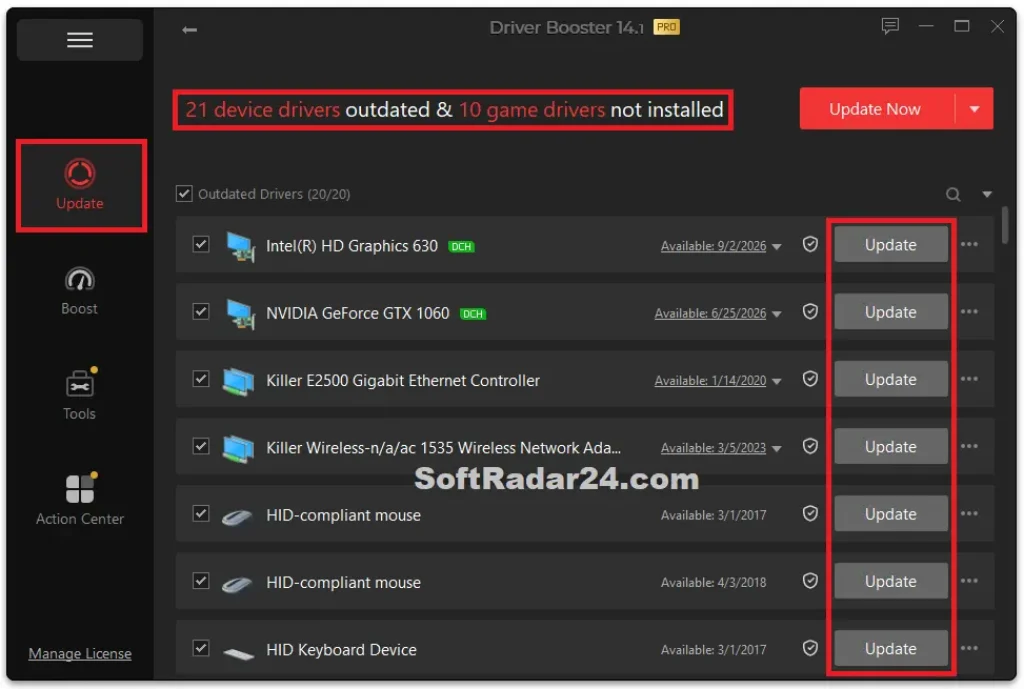
Drivers that users prefer to leave unchanged can be excluded from future scans through the Ignore option.
Automatic Driver Updates
IObit Driver-Booster 14 PRO can download or install driver updates while Windows is idle. Under Settings > Scheduler, users can enable automatic updates and choose which driver types to include, such as graphics, audio, network, and chipset drivers.
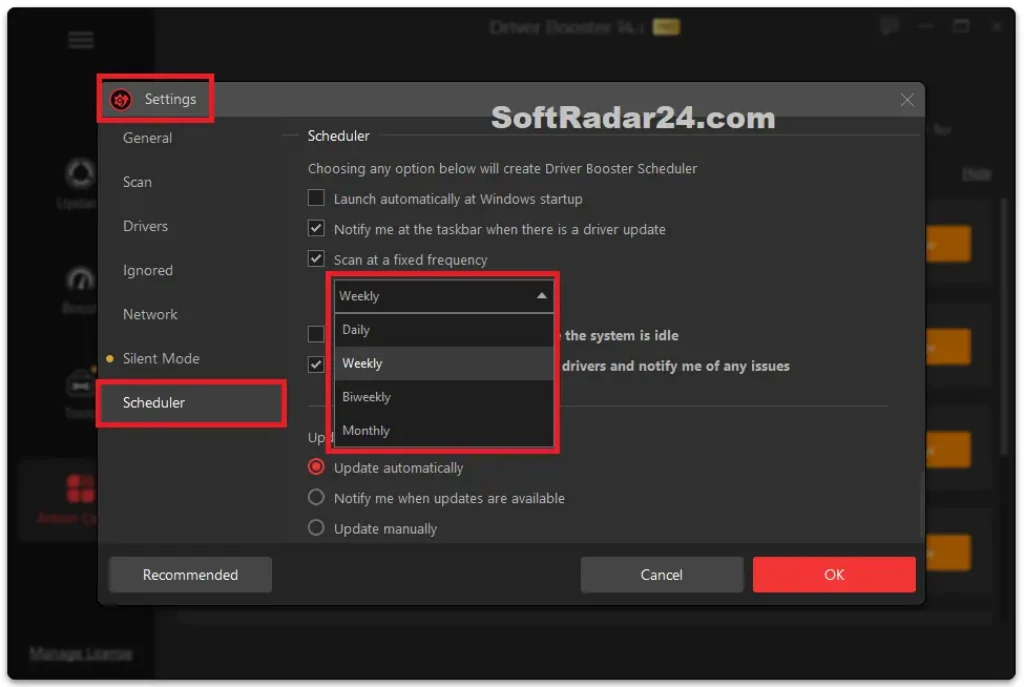
This allows selected hardware drivers to be updated without starting each installation manually.
Driver Backup and Restore
Driver Booster creates a Windows restore point before installing drivers by default. When automatic driver backup is enabled, IObit Driver Updater 14 PRO also saves previous driver versions before replacing them.
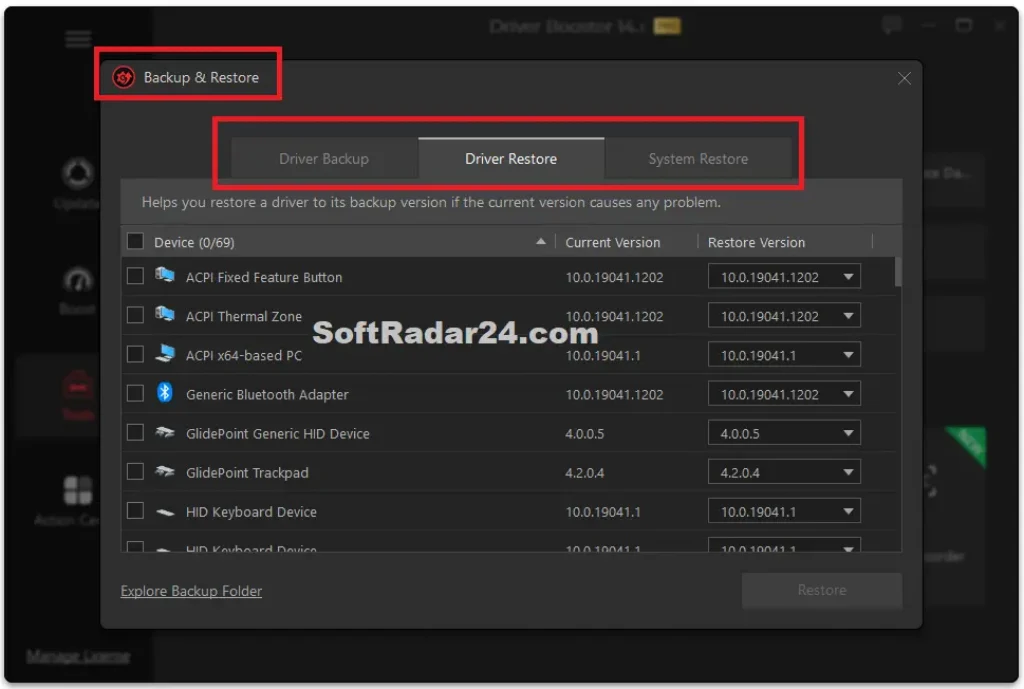
If an update causes problems, users can open Backup & Restore > Driver Restore, select an available backup, and reinstall the earlier version.
Game DLL Fixer and Device Repair
IObit Driver Booster Pro 14 includes Fix Missing Game DLLs, covering over 680 DLL files and 60 game components, including DirectX, Visual C++, XAudio, OpenAL, and PhysX. Real-time detection can alert users when required game files are missing.
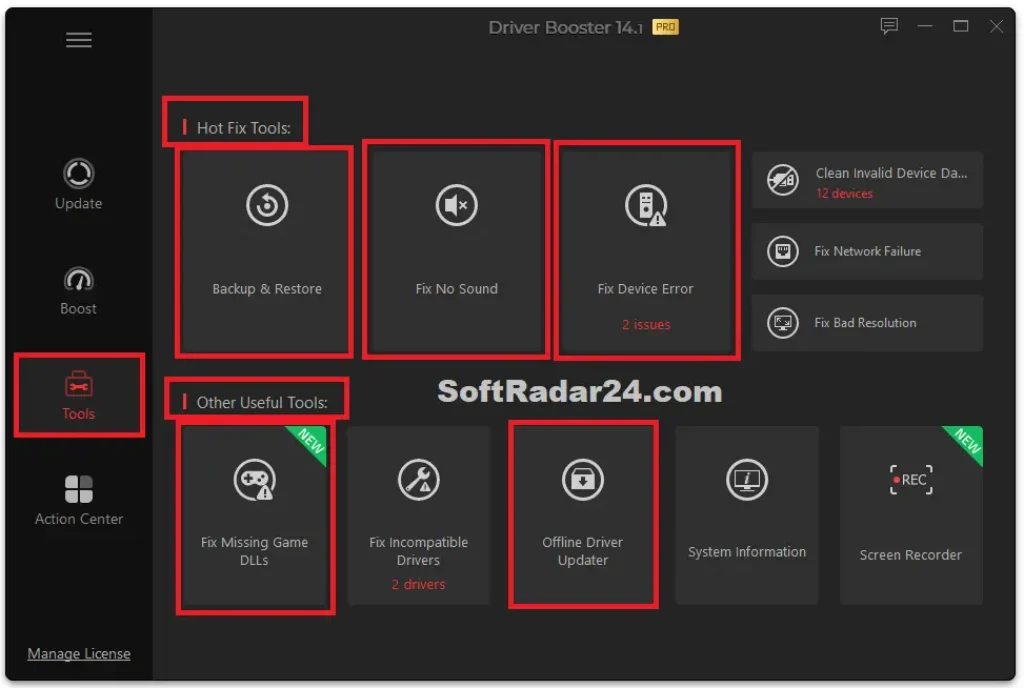
The Tools panel also includes PRO-only device error repair and tools for incompatible drivers, sound problems, and network failures.
Driver Booster 14 Free vs Pro
IObit Driver Booster Free and PRO differ in update controls, driver maintenance tools, and technical support. The comparison below shows which features are included in each edition, helping you decide whether a paid license is necessary for your needs.
| Features | Driver Booster 14 Free | Driver Booster 14 PRO |
|---|---|---|
| Driver Database | 12 million+ drivers | 23 million+ drivers |
| Manual Driver Updates | Yes | Yes |
| Automatic Driver Updates | Not supported | Yes, while PC is idle |
| Driver Download Speed | Limited | Speed limit removed |
| Driver Backup | Not included | Manual and automatic backup |
| Fix Device Error | Not included | Fix 35+ device errors |
| Game Ready Driver Updates | Standard driver updates | Priority updates |
| 24/7 Technical Support | Not included | Included |
Editor Says: A larger driver database does not mean every PC will need more updates. Check which drivers IObit Driver Booster 14 Free actually finds for your hardware before paying for PRO. If the available updates already cover your needs, a paid license may offer little additional value.
Check the Pros and Cons of Driver Booster 14
Driver Booster 14 has practical advantages, but some tools require extra steps or have limitations depending on your Windows setup. The pros and cons below highlight details worth considering before installing or purchasing.
Is Driver Booster 14 Pro Worth Buying?
Driver Booster 14 PRO is worth considering if you maintain several Windows PCs or regularly deal with driver-related issues. Before buying, run a scan with IObit Driver Booster 14 Free and check whether Windows Update already covers your needs. If you only update drivers occasionally, a paid license may not be necessary. Buying Driver Booster Pro makes more sense when regular driver maintenance is part of how you use your PC.
Best Alternative to Driver Booster
Driver Easy, DriverMax, and Driver Genius are three Windows driver updater alternatives to IObit Driver Booster 14. Compare their driver update options, recovery tools, and license terms to see which one better fits your needs.
Driver Easy Professional Best Values
DriverMax PRO Best Values

Driver Genius PRO & Platinum Best Values
Editor Says: Driver Easy is worth considering when a PC has lost its internet connection and needs an offline network driver scan. DriverMax allows free driver backups and a limited number of driver installations, while Driver Genius includes driver cleanup and system transfer tools. Choose the one that matches the task you need to complete.


