

IObit Uninstaller 16 PRO helps Windows users remove unwanted programs, including stubborn programs that fail to uninstall normally. It scans for leftover files and registry entries after removal and provides tools for managing browser extensions and pre-installed Windows apps. IObit Uninstaller 16 also lets users move supported programs to another drive without reinstalling them.
Discover the strengths & weaknesses of IObit Uninstaller 16
Explore the best alternative to IObit Uninstaller
Get giveaway license key for IObit Uninstaller 16 PRO
IObit Uninstaller 16 PRO Discount Code & Price
IObit Uninstaller 16 PRO coupon code offers include standalone licenses with up to 85% savings and 5-in-1 gift packs with additional IObit products. Choose a standalone license if you only need Uninstaller 16 PRO. For bundle deals, check the included product versions, license duration, and PC limits, as coverage may differ between products.
IObit Uninstaller 16 PRO & 4 Free Gifts – 5-in-1 / 1 Year / 1 PC
5-in-1 Bundle / 1 Year / 1 PC
- Protected Folder (1 Year / 1 PC) – Exclusive
- Start Menu 8 PRO (1 Year / 3 PCs) – Exclusive
- IObit Uninstaller 15 PRO (1 Year / 1 PC) – Exclusive
- IObit Software Updater 7 PRO (1 Year / 3 PCs) – Exclusive
- Smart Defrag 10 PRO (1 Year / 3 PCs) – Exclusive
- PRO technical support and license assistance are available through IObit.
Price before coupon
$9.99
$6.49Save $3.50
Buy Now60-day money-back guarantee from purchase date.
IObit Uninstaller 16 PRO & 4 Free Gifts – 5-in-1 / 1 Year / 3 PCs
5-in-1 Bundle / 1 Year / 3 PCs
- Protected Folder (1 Year / 1 PC) – Exclusive
- Start Menu 8 PRO (1 Year / 3 PCs) – Exclusive
- IObit Uninstaller 15 PRO (1 Year / 3 PCs) – Exclusive
- IObit Software Updater 7 PRO (1 Year / 3 PCs) – Exclusive
- Smart Defrag 10 PRO (1 Year / 3 PCs) – Exclusive
- PRO technical support and license assistance are available through IObit.
Price before coupon
$13.99
$9.09Save $4.90
Buy Now60-day money-back guarantee from purchase date.
IObit Uninstaller 16 PRO – 1 Year / 1 PC Coupon Code – 85% OFF
1 Year / 1 Windows PC
- One-year IObit Uninstaller 16 PRO license for 1 Windows PC.
- License service starts on the purchase date.
- License code is supplied by email after purchase.
- Activate with Enter Code > Register Now.
- License can be transferred to another PC while valid; the device limit still applies.
- Automatic product version updates and premium 24/7 technical support.
Regular price
$19.99
$2.99Save $17.00
Buy Now60-day money-back guarantee from purchase date.
IObit Uninstaller 16 PRO – 1 Year / 3 PCs Coupon Code – 83% OFF
1 Year / 3 Windows PCs
- One-year IObit Uninstaller 16 PRO license for 3 Windows PCs.
- License service starts on the purchase date.
- License code is supplied by email after purchase.
- Activate on each covered PC with Enter Code > Register Now.
- License can be transferred to another PC while valid; the 3-PC limit still applies.
- Automatic product version updates and premium 24/7 technical support.
Regular price
$59.93
$10.06Save $49.87
Buy Now60-day money-back guarantee from purchase date.
Get a Free IObit Uninstaller 16 Pro Giveaway Key
Looking for an IObit Uninstaller key? Get Free Valid IObit License Keys Here. Simply copy the key and activate it in the official IObit Uninstaller 16 application. Before using it, make sure the key is still within its validity period and check any applicable activation or usage limitations.
| Details | Get Valid IObit Uninstaller Pro Keys for Free |
|---|---|
| IObit Uninstaller 16 Pro Key | 12392-ADFA7-4983A-66ATF |
| License expiration date | May 01, 2027 |

IObit Uninstaller 16 Free Download
IObit Uninstaller Free helps remove any app or program on Windows 11/10/8.1/8/7/Vista/XP. Download the uninstaller for PC free to keep your computer clean, fast, and safe.

Advanced SystemCare 20 PRO Giveaway License Key
Boost Your PC and Free Up Space with Disk Deep Clean. IObit Advanced SystemCare 20 PRO to clean junk files, optimize Windows, speed up your PC, and protect your privacy with AI-powered tools.

IObit Driver Booster 14 Giveaway License Code
Driver Booster 14 PRO scans and fixes outdated or broken drivers with access to 23,000,000+ verified drivers. Improve PC performance and stability.
What Is IObit Uninstaller 16 PRO?
IObit Uninstaller 16 PRO organizes Windows program management into five main sections: Programs, Software Health, Browser Extensions, Windows Apps, and Toolbox. The Programs section lets users find installed programs by size, installation date, or usage frequency. Software Health checks for issues affecting installed programs, while Toolbox provides additional controls for tasks that go beyond standard uninstallation.
Key Features of IObit Uninstaller 16 PRO
A failed software uninstall, a full system drive, and an unwanted Windows component require different solutions. IObit Uninstaller 16 PRO provides separate tools for these situations, allowing users to choose the appropriate action rather than removing programs they still need.
Force Uninstall and Leftover Cleanup
IObit Uninstaller 16 PRO can remove programs that fail to uninstall normally. In Force Uninstall+, users can select the target folder or file path and start removal even when the standard uninstaller is broken or missing.
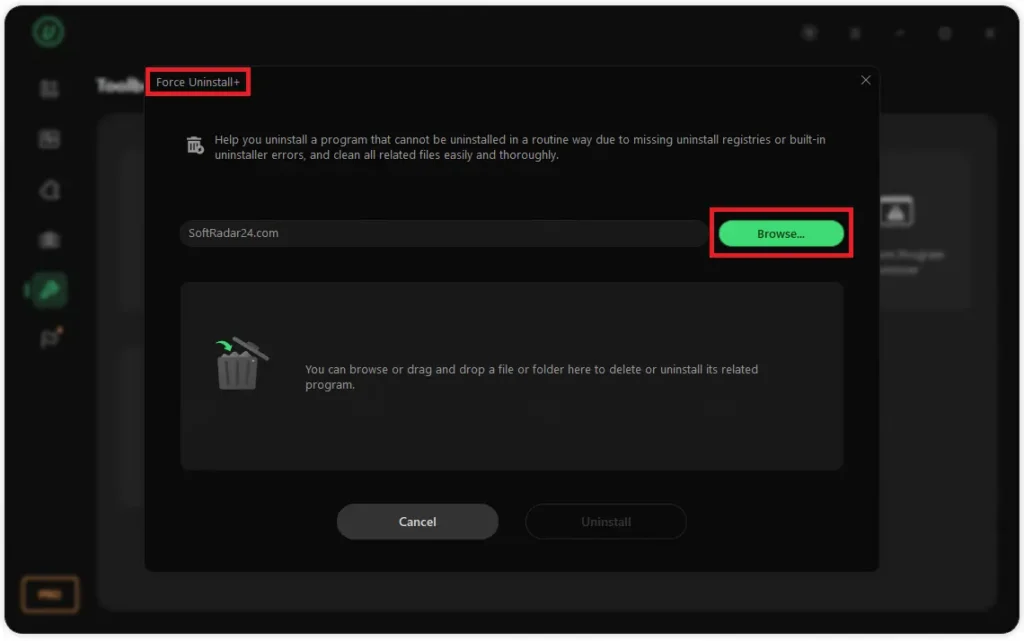
After the main removal step, Powerful Scan checks for leftover files, folders, and registry items so they can be reviewed and cleaned.
Software Relocator
Software Relocator helps move supported installed programs to another drive without reinstalling them. After scanning available drives, it lists software that can be relocated and shows the current and target location.
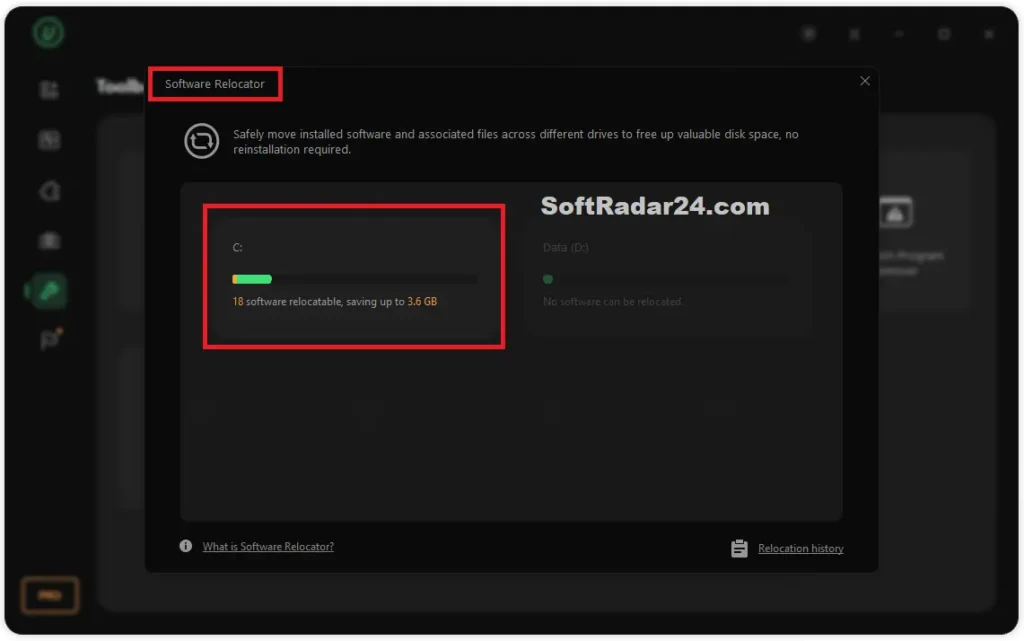
Users can also open Relocation History to move a program back to its original drive later if needed.
Bloatware Remover
Bloatware Remover focuses on preinstalled Windows apps and built-in components that are separate from normal desktop programs. It groups items under sections such as Accessories, Features, and Apps, making them easier to review before removal.
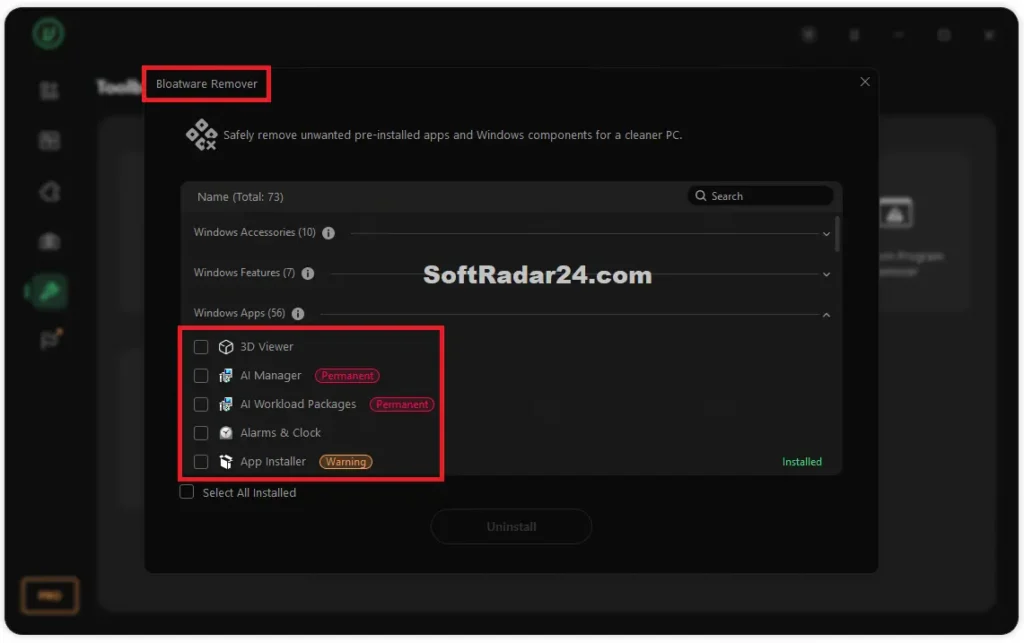
Some entries include warning labels, so users should check what the item does before uninstalling it.
Install Monitor and Software Health
Install Monitor records changes made during program installation, including created files and registry changes, so users can review what was added later.
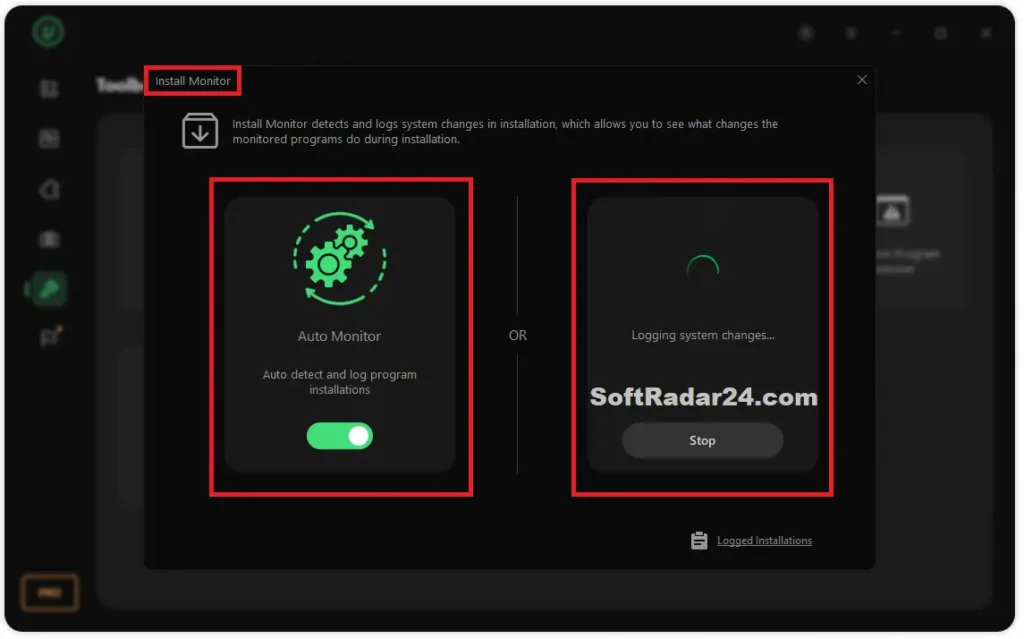
Software Health scans installed software for leftover files, invalid entries, installer files, notification issues, and other maintenance items. Instead of uninstalling everything at once, users can open the details and deal with specific problems first.
IObit Uninstaller 16 Free vs PRO
Several IObit Uninstaller 16 tools are available without payment, but some advanced controls require a PRO license. The comparison below separates shared features from paid options, helping you identify exactly what you gain by upgrading.
| Features | IObit Uninstaller 16 Free | IObit Uninstaller 16 Pro |
|---|---|---|
| Software Relocator | Included | Included |
| Stubborn Program Remover | Official Remover Database | Additional Supported Programs Database |
| Leftover Cleanup | Standard scanning and removal | Deeper scanning for hidden leftovers |
| Bundleware Removal | Detection and basic removal | Removal of all bundled components |
| Install Monitor | Installation logs | Enhanced cleanup using installation logs |
| Software Health | Scanning and limited fixes | Additional repair and cleanup options |
| Software Updater | Individual updates | One-click Update All |
| Product Updates | Manual updates | Automatic version updates |
| Technical Support | Standard support | Priority 24/7 support |
Check the Pros & Cons of IObit Uninstaller 16 PRO
IObit Uninstaller 16 PRO offers several ways to manage changes made during program removal, but not every action can be reversed. Some tasks also require extra care to avoid affecting installed programs or Windows stability. The pros and cons below highlight these practical considerations.
Is IObit Uninstaller 16 PRO Worth Buying?
IObit Uninstaller 16 PRO is worth buying if you frequently install and remove Windows programs and need more control over difficult removal tasks. For occasional uninstalls, Windows Settings or IObit Uninstaller 16 Free may be enough. Before purchasing, try the free edition with the programs you actually need to manage and check whether any required actions are restricted to PRO.
IObit Uninstaller 16 PRO Alternatives
Revo Uninstaller Pro 5.5.4 offers discounted licenses for individual Windows PCs and Portable use across unlimited PCs. Standard licenses cost $5.20 for one year of updates or $8.32 for two years, both with a 79% discount. Revo Uninstaller Pro Portable costs $6.24 for one year or $9.36 for two years, making it an option for users who work with multiple computers. The standard license is more affordable for a single PC, while Portable provides greater flexibility. Compare the license coverage and update periods before choosing a Revo Uninstaller Pro coupon code offer.

Revo Uninstaller Pro Best Values
What’s More You Want to Know About IObit Uninstaller
Can I activate IObit Uninstaller 16 PRO with a version 15 license key?
What if my IObit Uninstaller PRO license has reached its PC activation limit?
How can I recover a lost IObit Uninstaller 16 PRO license code?
Can I change my IObit Uninstaller PRO license from 1 PC to 3 PCs when renewing?
Can I request a refund for one product in an IObit Uninstaller bundle?

- 1iObit Uninstaller Coupon Codes
- 2iObit Uninstaller 16 Pro Giveaway Key
- 3What Is iObit Uninstaller?
- 4Key Features of iObit Uninstaller
- 5IObit Uninstaller Free or PRO
- 6IObit Uninstaller 16 PRO Pros and Cons
- 7Is iObit Uninstaller Worth Buying?
- 8IObit Uninstaller Alternatives
- 9IObit Uninstaller Frequently Asked Questions

