

Windows driver updates can fix hardware compatibility problems, but installing the newest driver is not always the safest choice. DriverMax PRO helps users identify missing and outdated drivers, review installation reliability records, and install suitable updates for their Windows PCs. Before replacing a driver, the PC driver updater tool archives the existing version and supports Windows restore points, providing recovery options if an update causes problems.
DriverMax Free allows two driver installations per day and ten per month, while PRO removes these limits. Available deals include 30-day, 90-day, one-year, two-year, and lifetime licenses, with discount codes offering up to 85% savings on selected plans. Compare current prices, subscription periods, and renewal conditions below to choose the right DriverMax PRO license.
DriverMax PRO License Deals & Coupon Codes
Compare DriverMax PRO subscription and lifetime options for Windows. These plans remove the free version’s install limit and can help you update, back up, restore, and recover drivers more flexibly.
DriverMax PRO – 30 Days Subscription License Coupon Code – 85% OFF
30-Day Subscription
- No daily limit for driver installs.
- Short-term access for urgent driver maintenance or a newly set up PC.
- The same scan, driver evidence, and install reliability records shown by DriverMax.
- Your previous driver is archived before each install.
- Windows creates a restore point before every driver installation.
- Includes Daily Health Check — 1-year subscription (regular price $29.00).
- Includes Advanced Task Manager — lifetime subscription (regular price $19.00).
- 30-day money-back guarantee.
DriverMax PRO – 90 Days Subscription License
90-Day Subscription
- No daily limit for driver installs.
- Covers a longer maintenance period than the 30-day plan.
- The same scan, driver evidence, and install reliability records shown by DriverMax.
- Your previous driver is archived before each install.
- Windows creates a restore point before every driver installation.
- Suitable if you want more time than a monthly plan without choosing a full year.
- One paid licence for one Windows PC during the subscription period.
- 30-day money-back guarantee.
DriverMax PRO – 1 Year Subscription License Coupon Code – 85% OFF
1-Year Subscription
- No daily limit for driver installs.
- One year of DriverMax PRO access on one Windows PC.
- The same scan, driver evidence, and install reliability records shown by DriverMax.
- Your previous driver is archived before each install.
- Windows creates a restore point before every driver installation.
- Useful if you want year-round driver maintenance without a lifetime commitment.
- Helps you update drivers, check driver history, and keep recovery options available.
- 30-day money-back guarantee.
DriverMax PRO – 2 Years Subscription License Coupon Code – 80% OFF
2-Year Subscription
- No daily limit for driver installs.
- Two years of DriverMax PRO access on one Windows PC.
- The same scan, driver evidence, and install reliability records shown by DriverMax.
- Your previous driver is archived before each install.
- Windows creates a restore point before every driver installation.
- Longer coverage for users who prefer fewer renewals.
- Useful for keeping driver backup and recovery tools available across multiple update cycles.
- 30-day money-back guarantee.
DriverMax PRO – Lifetime License Coupon Code – 80% OFF
Lifetime License
- One payment with no renewal billing.
- No daily limit for driver installs.
- Lifetime DriverMax PRO access on one Windows PC.
- The same scan, driver evidence, and install reliability records shown by DriverMax.
- Your previous driver is archived before each install.
- Windows creates a restore point before every driver installation.
- Includes the free gift Advanced Task Manager.
- 30-day money-back guarantee.
Prices are shown in USD. Discount percentages are calculated from the regular and sale prices supplied for each eligible plan.
What Is DriverMax PRO?
DriverMax PRO is a Windows driver updater from Innovative Solutions. It identifies installed hardware, compares available driver packages with the versions already on your PC, and lets you choose which updates to install. It can help when Windows cannot identify a device, when a network or audio driver is missing, or when you want to inspect driver versions before making changes to a working computer.
DriverMax 18 does more than display a list of newer drivers. Each supported driver package can show its provider, signature status, release date, and a record of previous installations. That information matters because a newer version is not automatically the best choice for every PC. You can inspect a proposed update before approving it rather than treating the highest version number as a reason to install.
The free and paid editions use the same scanning, driver catalogue, backup tools, and safety measures. The practical reason to purchase DriverMax PRO is to remove the installation limit of the free edition, particularly if you need to update several drivers during a Windows setup or repair.
DriverMax Free vs PRO: What Changes?
DriverMax Free is not a short trial. Its scanning and driver-management functions remain available without an expiry date. The difference between Free and PRO is how many drivers you may successfully install during a given period.
| DriverMax feature | Free | PRO |
|---|---|---|
| Driver installations | 2 per day and 10 per month | No daily or monthly installation limit |
| Scan installed hardware | Included | Included |
| Review driver version and reliability information | Included | Included |
| Back up and restore drivers | Included | Included |
| Driver archive and Windows restore-point safeguards | Included | Included |
| Scheduled driver scans | Included | Included |
| Account required to scan | No | No; account useful for managing a purchased licence |
When is PRO worth paying for? If you only install one or two drivers occasionally, Free may be sufficient. If a fresh Windows installation identifies many missing or outdated drivers, the free limit may force you to spread installations across multiple days. A PRO licence allows you to finish those approved installations without waiting for the next allowance. The free daily limit is measured over a rolling 24-hour period, and only successful installations count toward it.
DriverMax PRO Features and Driver Update Safeguards
The following functions are available in DriverMax 18; they are not exclusive bonuses unlocked by PRO unless stated otherwise.
- Hardware-specific driver matching: DriverMax uses hardware and compatible device IDs, the driver’s declared Windows compatibility, release information, and previous installation results to assess a candidate package.
- Driver reliability evidence: Where enough installation records exist, you can see how a particular package performed for other users. A package with fewer than five recorded installations does not receive a percentage.
- Signature and package checks: DriverMax says it scans offered packages for threats and checks their digital signatures; the driver card identifies signed packages. A digital signature is useful information, not a guarantee that an update is appropriate for every configuration.
- Selective installations: You can choose individual drivers or select several updates instead of installing every available item automatically.
- Driver backup: The Backup tab can archive the drivers installed on the PC. This is especially useful before a Windows reinstall or major system change.
- Recovery preparation: DriverMax keeps a copy of an existing driver before replacing it and requests a Windows restore point. If Windows cannot create the restore point, DriverMax reports the failure.
- Driver scan history: The History tab records updates that were found, downloaded, or installed. These are different outcomes, not interchangeable success labels.
- Scheduled scanning: You can set a daily check time, receive notifications, and choose whether DriverMax starts with Windows.
- Unknown-device identification: A scan can identify devices without suitable drivers; obtaining a missing package from DriverMax’s catalogue still requires a working network connection.
- Unrestricted PRO installations: A paid licence removes the Free edition’s two-per-day and ten-per-month limits without replacing the other driver tools.
How to Use DriverMax 18 on Windows
The instructions below follow the controls shown in DriverMax 18 and the current official product documentation. The four screenshots were prepared for this page, with important controls marked in red. They illustrate the respective workflows without claiming that a scan or installation was tested for every device.
1. Scan Your Windows PC and Install Selected Driver Updates
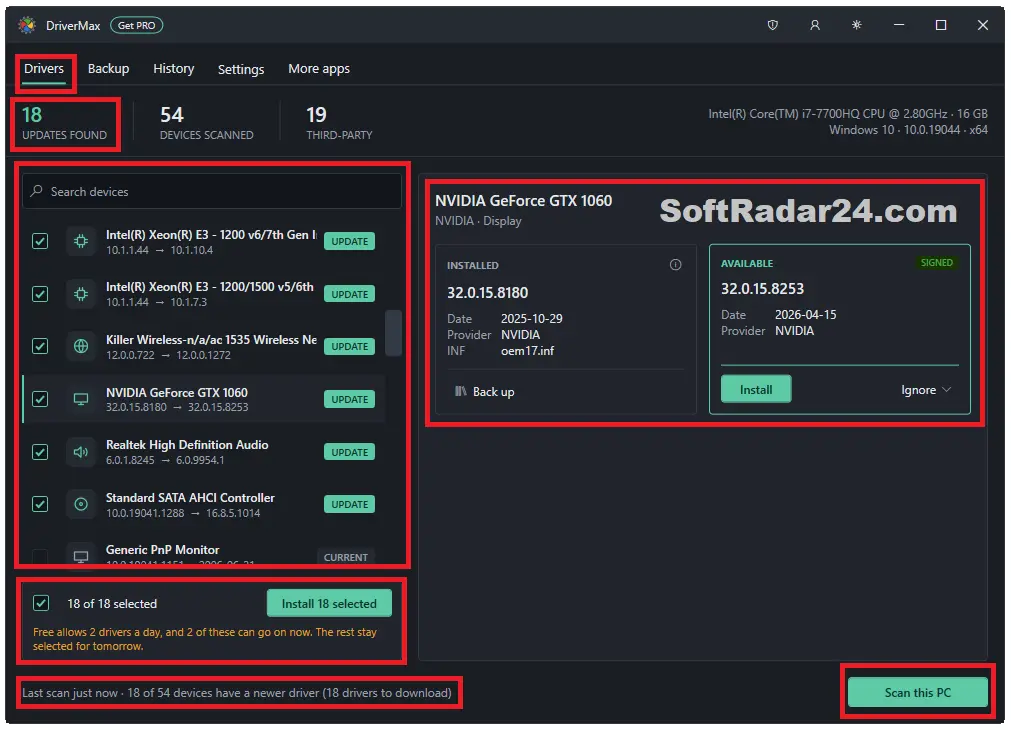
DriverMax 18 opens its driver-management area under Drivers. Select Scan this PC at the bottom of the window to refresh the device list and check for possible updates. The results include counts for Updates Found and Devices Scanned; these numbers are not identical because one scan can inspect many devices that need no update.
- Open DriverMax 18, choose Drivers, and press Scan this PC.
- Review the devices shown on the left. Use Search devices if you need to locate a particular graphics, audio, network, or chipset entry.
- Select a device to compare its Installed driver with the Available driver shown on the right. Check the provider, version, date, and SIGNED label where present.
- If the proposed package is appropriate, use the individual Install button. To queue several approved updates, tick their checkboxes and choose Install selected.
- Read the confirmation dialog, which identifies the existing and proposed versions, before proceeding. Restart Windows if the completed installation requests it.
Selection tip: DriverMax can display many update candidates at once, but the number found is not a recommendation to install them all. Give priority to a missing or malfunctioning device and inspect working hardware carefully, especially if a specific driver is already stable.
2. Back Up Installed Drivers Before a Windows Reinstall
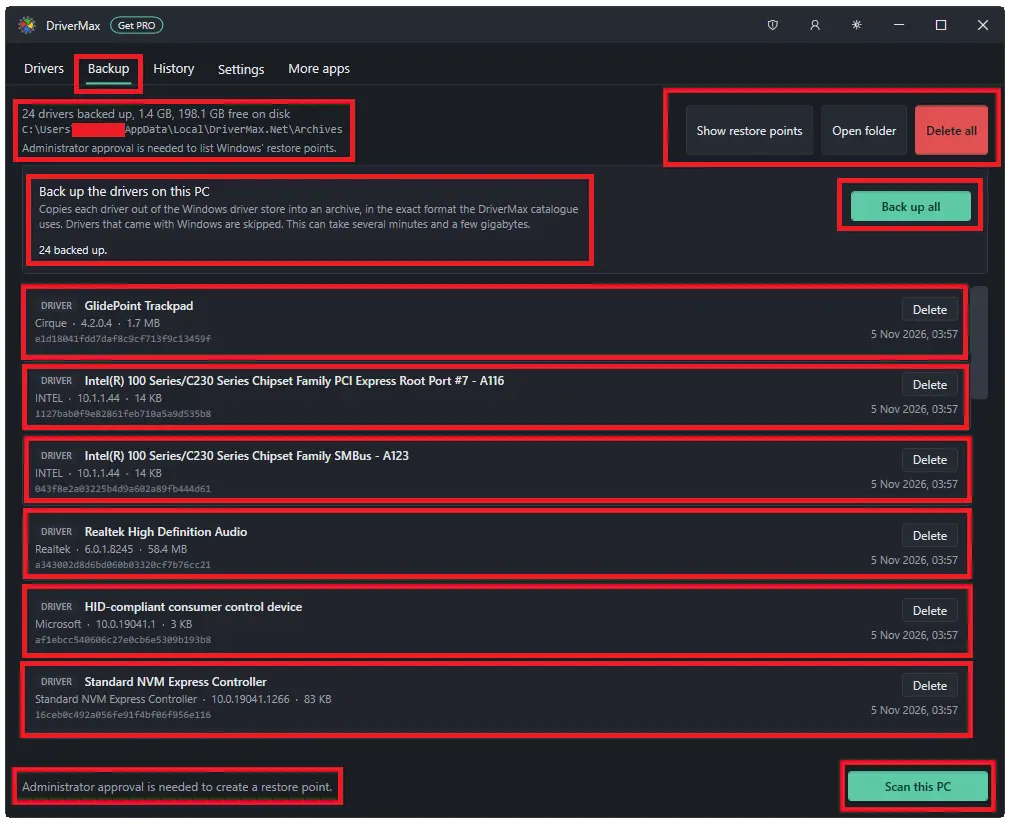
DriverMax 18 includes a separate Backup area. Unlike a regular update scan, this operation creates local copies of drivers that are already installed. It is a useful precaution before changing Windows or replacing storage because your existing network driver may be needed before an internet connection is available again.
- Open DriverMax 18 and select the Backup tab.
- Choose Back up all in the section for drivers on the current PC.
- Allow the archive operation to finish. DriverMax displays the number of backed-up drivers, total archive size, and available disk space.
- Select Open folder to locate the archives. Copy the necessary backups to external storage before erasing or replacing the system drive; an archive left on a drive you wipe will not help after the reinstall.
- Use Show restore points to inspect Windows restore-point information. A restore point and a saved driver archive are separate recovery resources.
The screenshot also shows a notice that administrator approval is needed to create a Windows restore point. Do not assume a restore point exists merely because the driver archive completed successfully. DriverMax’s documentation says backed-up drivers can be restored from the Backup area, but the exact restoration control is not visible in this screenshot; we therefore do not invent a button name or an unsupported sequence.
3. Check Driver Update History Without Confusing Found and Installed
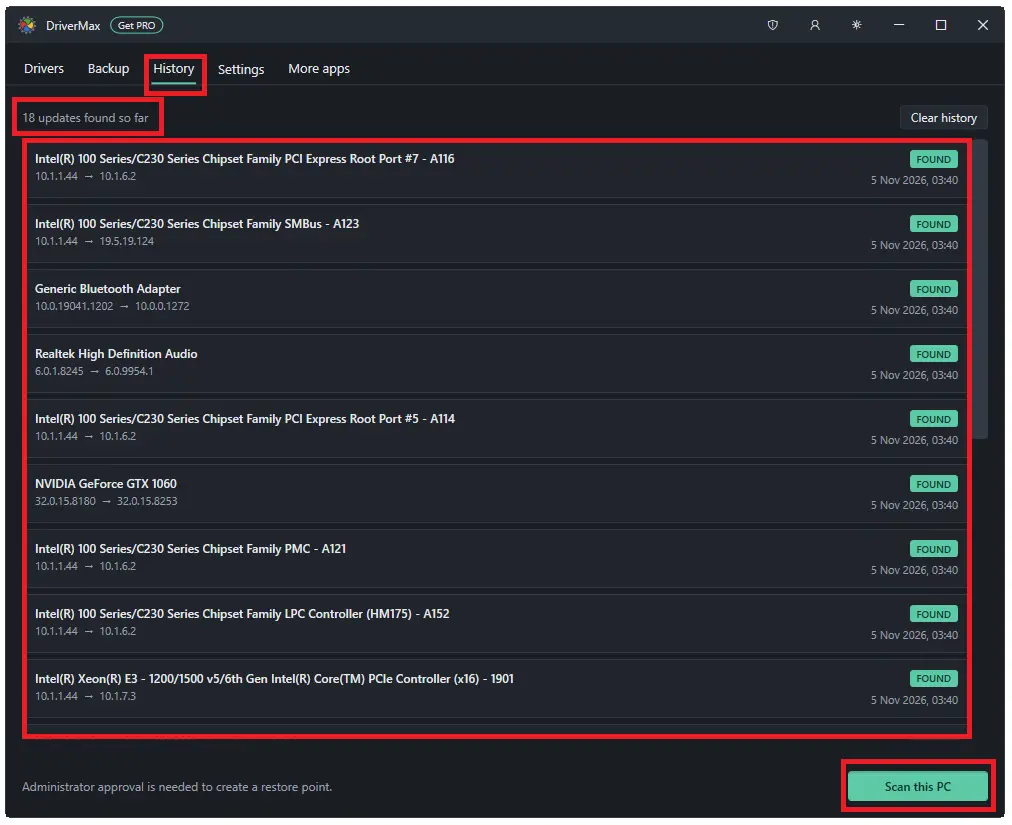
Open History to review driver events recorded by DriverMax. The page displays the device name, version change, date, and status for each entry. In the screenshot, the entries are marked FOUND, meaning DriverMax identified potential updates. That label does not prove that the updates were downloaded or installed.
- In DriverMax 18, select History.
- Read the summary at the top and review the event list below it.
- Compare the earlier and later version numbers for the relevant device.
- Interpret each status literally: FOUND identifies a discovered update, while DOWNLOADED and INSTALLED, when present, describe later stages.
- Use Clear history only when you no longer need this event record. Clearing the displayed history should not be treated as a driver rollback procedure.
4. Schedule Driver Scans and Configure Notifications
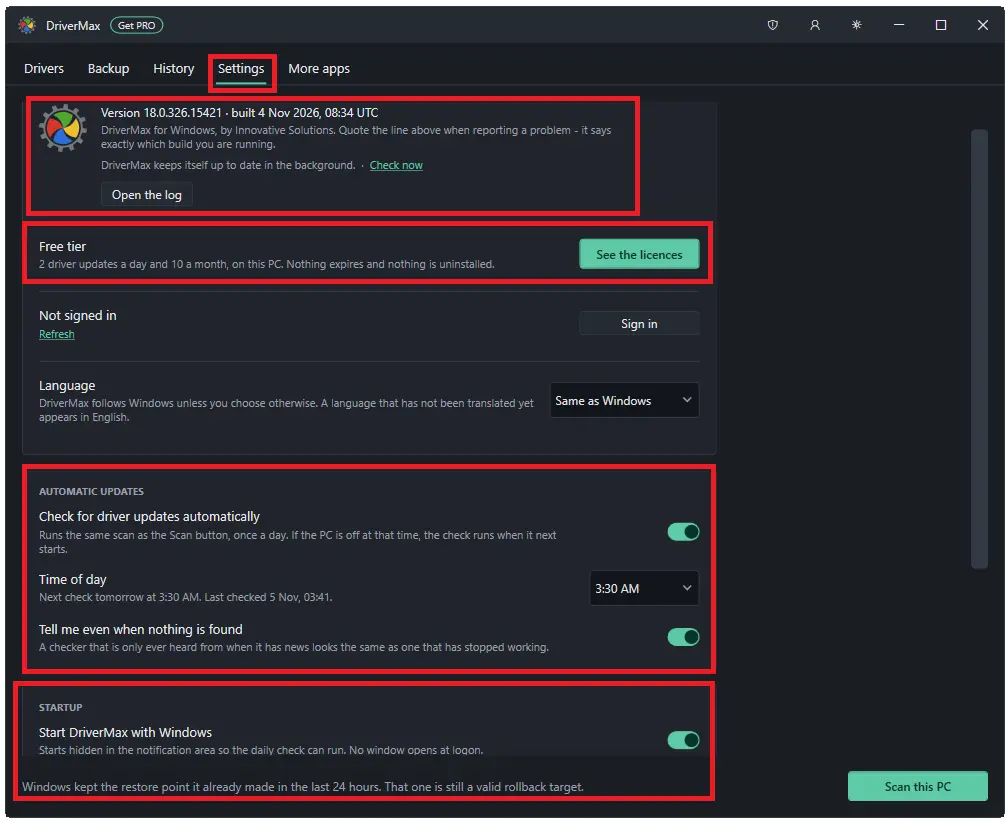
DriverMax 18 can check for new drivers on a schedule, so you do not have to remember to run a manual scan. Scheduled discovery is different from automatic installation: the current product documentation says DriverMax does not install a proposed driver until you approve it.
- Select Settings and find Automatic updates.
- Enable or disable Check for driver updates automatically according to your preference.
- Choose a suitable Time of day. If the computer is off at the scheduled time, the check runs after it next starts.
- Use Tell me even when nothing is found to decide whether to see notifications for scans that discover no updates.
- Under Startup, set Start DriverMax with Windows if you want the scheduled checker available in the notification area.
The same Settings screen shows the installed DriverMax build, licence or Free tier status, and language settings. It is the appropriate place to confirm whether PRO activation is in effect before diagnosing an installation-limit message.
5. Recover from a Problematic Driver Update
When a new driver causes malfunction, first identify the affected device and the version change rather than installing a series of unrelated updates. DriverMax prepares two types of safeguards: an archive of the previous driver and a Windows restore point, when Windows permits one to be created.
- Review the affected device and recent status information in History. A record marked FOUND alone does not confirm that a replacement driver was installed.
- Open Backup and inspect the available archives or Show restore points before attempting recovery.
- Use the backed-up driver through the restoration workflow available in your installed build, or use Windows recovery tools where an appropriate restore point exists. Do not delete the only backup copy first.
- After recovery, verify that the device works and that the intended driver version is installed before attempting further changes.
Important: A restore point is not guaranteed. If Windows blocks its creation, DriverMax reports that condition. Backed-up driver files and Windows System Restore are complementary, not identical, recovery methods.
6. Activate DriverMax PRO or Move a Licence to Another PC
DriverMax says a purchase made on the same computer can activate that PC automatically once payment clears. The registration code is also sent by email for future activation or a Windows reinstall.
- On another computer, open DriverMax and select the account button in the title bar.
- Choose I have a registration code, enter the code from the purchase email, and press Continue.
- Sign in to the relevant DriverMax account, or follow the on-screen account setup if needed to hold the licence.
- To free a licensed place before changing PCs, open Settings on the old computer, view the licence’s PC list, and use Release for the applicable device when offered.
- Activate the new Windows installation with your account or registration code. If the original PC is unavailable, DriverMax documents an automatic release of a seat unused for 30 days when another computer requests it.
The standard lifetime licence is not an unlimited-computer licence. It ordinarily covers one active PC at a time; releasing a seat lets you move it. A different unlimited-PC lifetime licence exists separately on the vendor’s site and is not one of the five offers listed above.
Windows Compatibility and Technical Details
DriverMax 18 supports older Windows versions as well as current releases. Before buying, distinguish operating-system compatibility from driver availability: a supported Windows edition does not guarantee that every manufacturer has released a suitable package for every device.
| Specification | DriverMax 18 details |
|---|---|
| Software type | Windows device-driver scanning and update tool |
| Supported desktop Windows | Windows 11, 10, 8.1, 8 and 7 |
| Windows architecture | 32-bit and 64-bit editions as documented by the vendor |
| Server support | Corresponding Windows Server editions are listed by the vendor |
| Internet connection | Needed to query current online driver availability and fetch drivers not already stored locally |
| Offline local inspection | Installed hardware can still be listed, but online catalogue results are unavailable without server access |
| Driver catalogue | Vendor reports support for more than 2.3 million devices |
| Driver safeguards | Previous driver archive; Windows restore point where creation succeeds |
| Free installation limit | Two successful installs in a rolling 24-hour period and ten per month |
| PRO installation limit | No daily or monthly install cap on the licensed PC |
| DriverMax account | Not required for free scanning; used for managing a paid licence |
| Language support | 14 languages listed by the vendor |
Offline Scan clarification: Older DriverMax website material still describes generating an offline scan file. That control is not shown in the supplied DriverMax 18 screenshots, and the current FAQ says a missing network driver cannot be downloaded directly on a disconnected PC. This guide therefore does not promise an offline driver scan and download workflow in DriverMax 18. Keep copies of essential network drivers before reinstalling Windows, or temporarily establish a connection through phone tethering or a supported USB network adapter.
Which DriverMax PRO License Should You Buy?
All five offers above remove the Free edition’s driver-installation limit. The appropriate choice depends on how long you need the licence, not on a different set of scanning or backup functions.
- 30-day subscription: Suitable for a short maintenance or Windows setup period. The offer above lists two additional gift licences. Check the monthly renewal amount and whether the promotional price applies only to the initial period.
- 90-day subscription: Provides a three-month term. At the listed price of $59.70, it costs more than the other discounted annual and lifetime offers on this page, so compare checkout terms carefully before choosing it. This term is not among the four primary durations currently advertised on the vendor’s main purchase page.
- 1-year subscription: A practical choice for a Windows PC that needs updates across the coming year without committing to perpetual access. The current discounted checkout is listed above at $8.66.
- 2-year subscription: Extends paid access over two years. Consider it if you prefer a longer term but do not need a non-expiring licence.
- Lifetime licence: A one-time purchase with no renewal for the ordinary one-PC-at-a-time licence. It avoids future subscription charges but does not mean unrestricted activation on multiple PCs at once.
DriverMax’s public checkout describes the regular 30-day, 1-year, and 2-year subscriptions as renewing monthly, annually, or every two years respectively. Promotional checkout terms may differ, and the renewal terms of the separate 90-day checkout should be read directly before payment. The vendor advertises a 30-day money-back guarantee; keep the order confirmation and review the final billing terms for the selected offer.
To compare offers from other software publishers, visit our software discounts and brands directory. The sales boxes on this page are specific to DriverMax PRO and should not be confused with the separate unlimited-PC licence.
DriverMax PRO FAQs
Is DriverMax Free a trial that expires?
No. DriverMax Free does not have a trial countdown. You can keep scanning devices, reviewing driver information, and using backup tools. The limit applies to successful driver installations: two per rolling 24-hour period and ten per month.
Can DriverMax update drivers without an internet connection?
DriverMax can inspect hardware already present on the computer without a network connection, but it needs access to its online catalogue to find and download new packages. If a Windows reinstall leaves you without a network driver, a preserved driver backup or temporary internet connection is more dependable than assuming an older Offline Scan feature is still available.
Can DriverMax PRO fix every missing or outdated driver?
No driver updater can guarantee a compatible package for every device. The hardware ID, Windows edition, available signed packages, and the device manufacturer’s support all matter. DriverMax can help identify and locate candidates, but some failures require manufacturer-specific drivers or further Windows troubleshooting.
Does DriverMax PRO include driver backup and restore?
Yes, but these tools are also included in DriverMax Free. The Backup tab can archive installed drivers; DriverMax also keeps the previous driver when installing a replacement. Windows restore-point creation is another safeguard, provided Windows allows it. Store valuable archives somewhere they will survive a Windows reinstall.
Can I transfer a DriverMax lifetime licence to a new PC?
Yes, according to the vendor’s licensing guidance. The ordinary lifetime licence covers one active PC at a time. Release the old PC’s licence seat through Settings when possible, then activate the new computer using the registration code or associated account. This does not turn a single-PC licence into an unlimited-PC licence.
Does DriverMax PRO renew automatically, and is there a refund policy?
DriverMax describes its time-limited plans as recurring subscriptions, while the ordinary lifetime offer is paid once without renewal. Verify the next billing date and renewal amount on the actual checkout, especially for discounted promotional plans or the separate 90-day offer. The vendor states a 30-day money-back guarantee.
More Popular Software Coupon Codes & Deals
Explore coupon codes and discounted licenses from other software brands, including driver updaters, disk health monitoring tools, and DVD and video software. Compare available deals and choose the software that meets your needs.

IObit PRO Coupon Codes & Bundle Deals
Compare discounted license code for Advanced SystemCare PRO, Driver Booster PRO, IObit Uninstaller PRO, Malware Fighter PRO, and other IObit tools, or choose 6-in-1 and 8-in-1 bundles for PC cleanup, optimization, driver updates, and security.
Up to 95% Discount

WiseCleaner Coupon Codes & Deals
WiseCleaner offers discounted PRO licenses and software bundles for Windows cleanup, deleted file recovery, registry maintenance, file protection, and duplicate file removal. Compare annual and lifetime licenses with savings of up to 90%.
Up to 90% OFF

Digiarty WinXDVD Coupon Codes & Deals
Offers for WinX DVD Ripper Platinum, VideoProc Converter AI, Winxvideo AI, WinX MediaTrans, WinX DVD Copy Pro and other Digiarty software licenses.
Up to 86% OFF
Easeware Technology Limited – Driver Easy PRO Coupon Codes & License Deals
Driver Easy PRO Windows Driver Updater — 1 PCs, 3 PCs, 5 PCs, 10 Computers, 30 Computers, 50 Computers, 100 Computers License Key / 1 Year.
20% Discount Code
Hard Disk Sentinel Standard, Professional & Pro Family Lifetime License Coupon Codes & Deals
Compare lifetime licenses for 1 or 5 Windows PCs. Standard monitors HDD and SSD health; Professional adds advanced surface tests, disk repair, scheduled backups and NAS monitoring.
40% Discount

Driver Genius Pro & Platinum Edition Coupon Codes & Deals
Driver Genius Pro & Platinum Edition — 1 Year/3 PCs, 2 Years/3 PCs, Extra 60 day License Codes.
Up to 66% OFF


